How to delete or remove a Google review: every option that works, with the odds
How to delete or remove a Google review: only Google, for a policy violation, or the reviewer can. Every route that works, with the odds and timelines.
Opens in a new tab. It is a recording of a desktop screen, so turn your phone sideways or tap full screen in the player.
The demo shows where to click for this part. The written steps for it follow below. When you have done them, continue to Part 2.
Imagine a one-star Google review hit your profile this morning. The reviewer used a name you don’t recognize. The “service” they’re complaining about isn’t something you actually offer. You’re 90% sure they were never a customer. You want it gone.
Google’s review removal process is slow, opaque, and biased toward keeping reviews up. There is no phone support and no human reviewer for initial appeals; decisions are made by the same automated system that allowed the review.
If you follow the correct process from the start, your chances of removal increase. Many owners fail by attempting to remove legitimate reviews, or by making requests that Google cannot fulfil. So let’s start there.
You cannot delete a review on your own Google Business Profile. Not from the dashboard, not from the Maps app, not by finding the right person to email. If you still call it Google My Business, same answer. There has never been a delete button on the business side.
Exactly two parties can make a review disappear:
Google, when the review violates its review content policy and someone reports it with enough specifics to act on.
The reviewer, who can delete or edit their own review at any time.
That is the whole list. Every route in this post is one of those two, dressed differently.
Two things owners try every week that do not work:
Deleting the Business Profile. The listing and its reviews typically stay on Maps, and you lose the reply button.
Turning reviews off. There is no setting for it.
And a caution about anyone selling “guaranteed removal.” They are filing the same forms you can file, or doing something to your profile that puts it at risk. More on them below.
First: is it a Google review policy violation, or a bad review?#
Google does not remove reviews because you think they are unfair. Google removes reviews that violate the review content policy. Those are two very different things, and the difference decides everything that follows.
A review qualifies for removal if it falls into one of these buckets:
Spam or fake engagement. Posted by a fake account, a bot, or as part of a coordinated attack (multiple new accounts, posted within a short window).
Off-topic. About something unrelated to a customer experience at your business. Political rants, complaints about a competitor, disputes with a different company.
Conflict of interest. Posted by a current or former employee, a competitor, or someone with a financial interest in harming the business.
Restricted or prohibited content. Profanity, hate speech, sexually explicit content, personal information (phone numbers, addresses, medical details).
Misinformation. Clearly false statements presented as fact, with no plausible basis in a real customer experience.
A review does not qualify only because:
You can’t find the reviewer’s name in your customer database. Google treats that as a factual dispute about a booking, not a policy violation, unless you have hard, verifiable proof they were never there.
The review is angry or rude. Aggressive language is not harassment, per Google’s rules.
The review is wrong about something minor. A customer misremembering a price or a date is not misinformation.
The review is from a former customer with a grudge. That is a bad review, not a violation.
If your review fits one of the removal buckets, proceed. If it is a bad-but-legitimate review, skip to the end of this post. Your time is better spent on a calm reply and on fresh reviews that push it down the page.
How to get a Google review removed: the escalation, in order#
Use the six channels in order. Skip the extortion form and the legal form if they do not apply to your case. Do not skip or reorder the others, because each later step asks what you already tried.
If you are looking at seven reviews at once from brand-new accounts, the order changes: reply first, then report every review in one session. That path is in the coordinated attack guide.
1. Report the review from your Business Profile dashboard
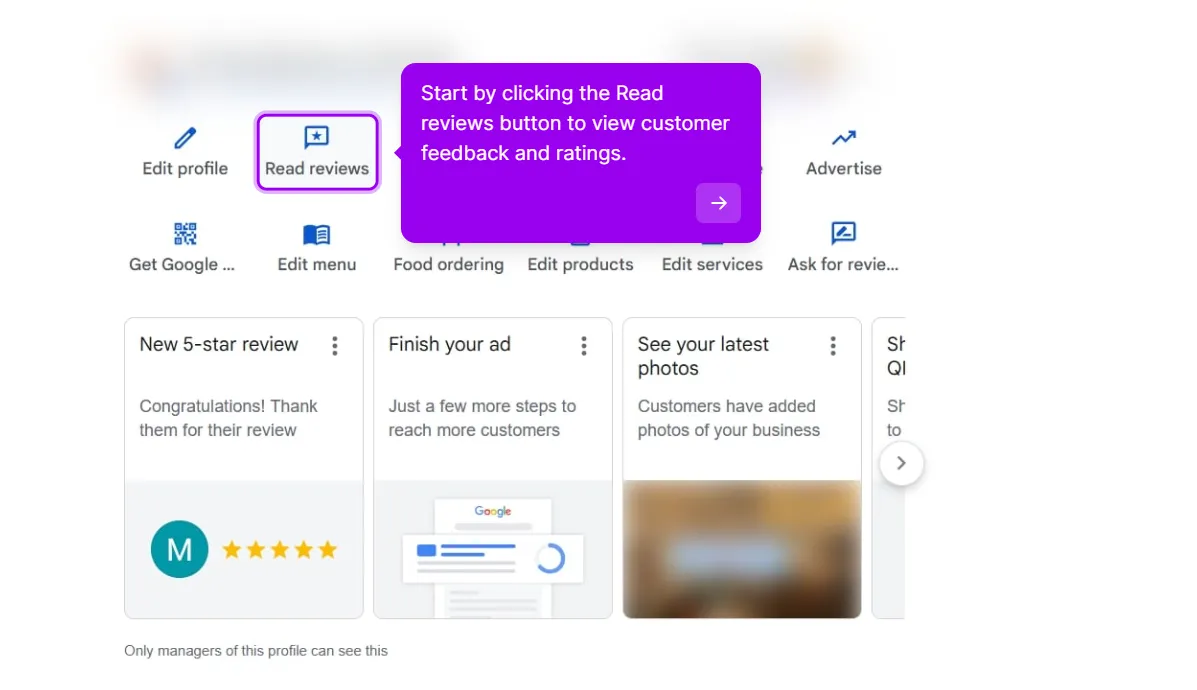
Sign in to your Google Business Profile and open your reviews. On the owner view in Google Search, that is the Read reviews shortcut.
Step 1: Open the Reviews panel from the Read reviews shortcut on your profile.
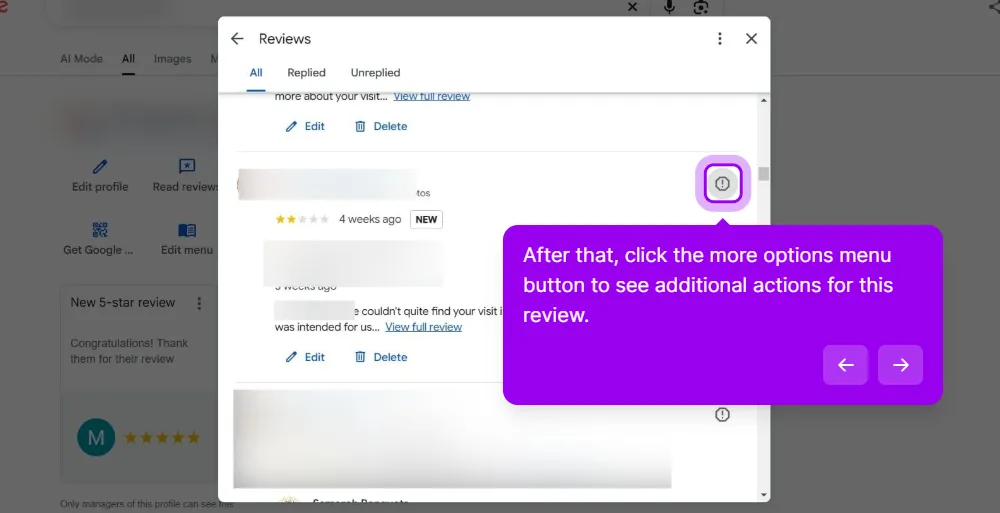
Find the review you want to report and click the more options menu next to it, then select Report review.
Step 2: The more options button beside the review is where Report review lives.
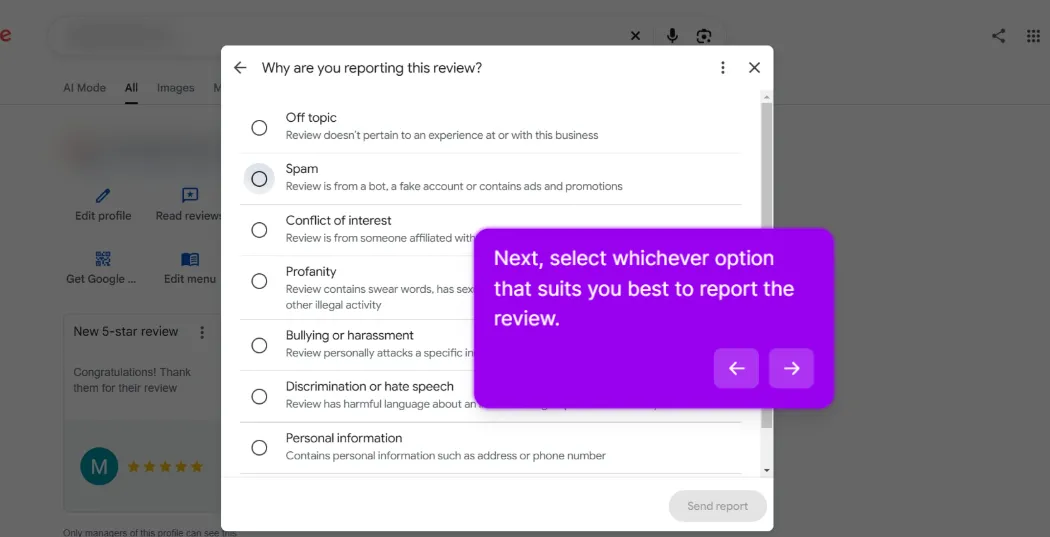
Pick the one reason that matches the violation. Google’s current list reads:
Off topic for a review that does not pertain to an experience at the business
Spam for a review from a bot, a fake account, or one carrying ads and promotions
Conflict of interest for a competitor or employee review
Profanity for swear words and similar content
Bullying or harassment for a review that personally attacks someone
Discrimination or hate speech for harmful language about a group
Personal information for an address, a phone number, medical or ID details. This is the fastest removal category.
Step 3: One review, one reason. The Send report button stays greyed out until you pick one.
Pick one reason, the most accurate one. Filing a fake review under Personal information because that category moves faster gets you a denial, not a fast removal.
Submit. You will usually get a confirmation that the report was received. Google’s automated system reviews it. Decisions typically come back within 3 business days, sometimes within 24 hours.
About 30% of reports succeed at this step. The other 70% get the dreaded “the review didn’t violate our policies” response. Do not report it again from the dashboard. The next step exists for exactly this moment.
Opens in a new tab. It is a recording of a desktop screen, so turn your phone sideways or tap full screen in the player.
The demo shows where to click for this part. Keep reading for what happens after you submit, how long Google usually takes, and what to do if it gets rejected.
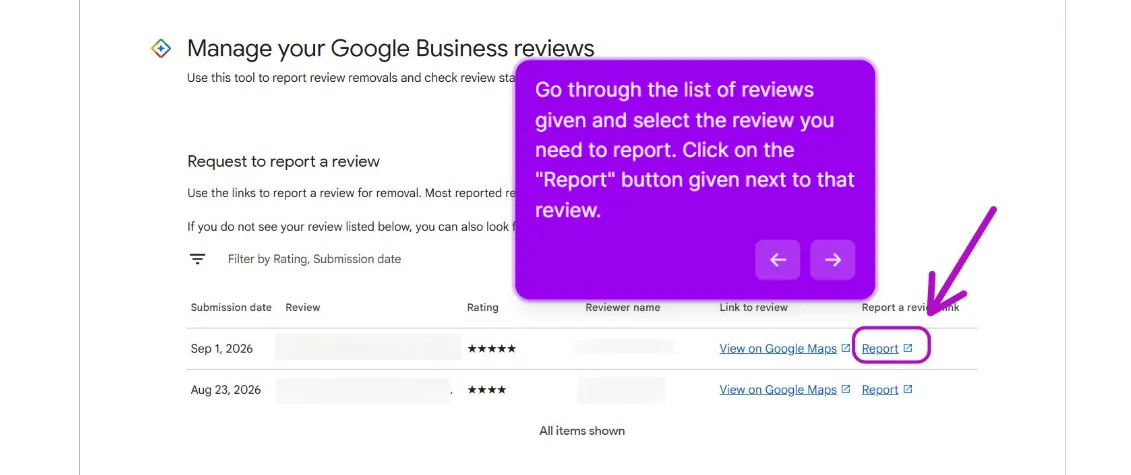
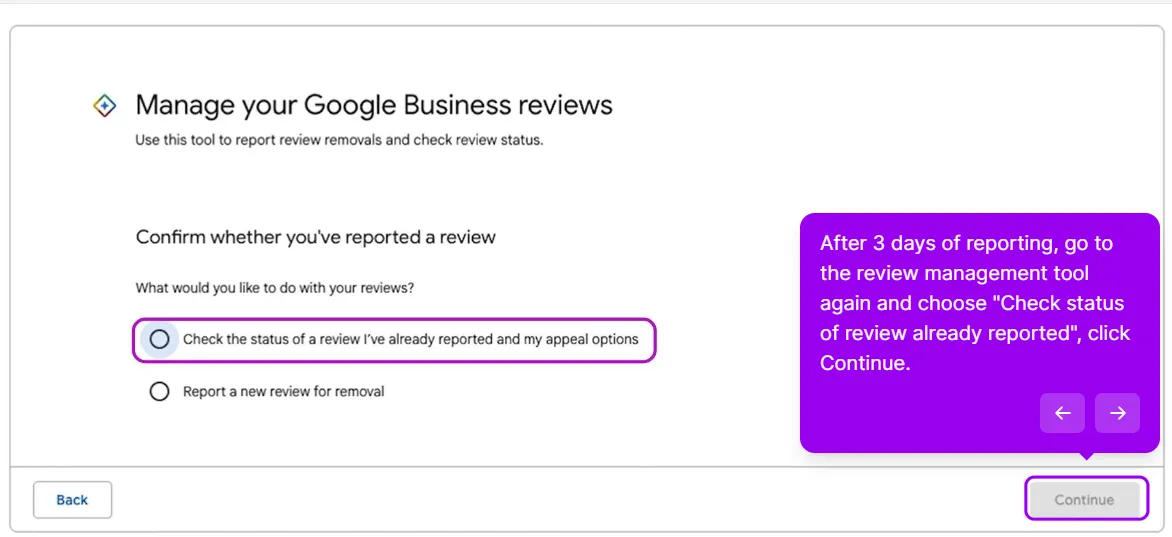
2. Check the status and file your one appeal in the Reviews Management Tool
This is the step most owners never find, and it is the closest thing Google has to a formal way to dispute a Google review. The walkthrough above was recorded on a personal-information report, and the status view and the appeal work the same way for every category.
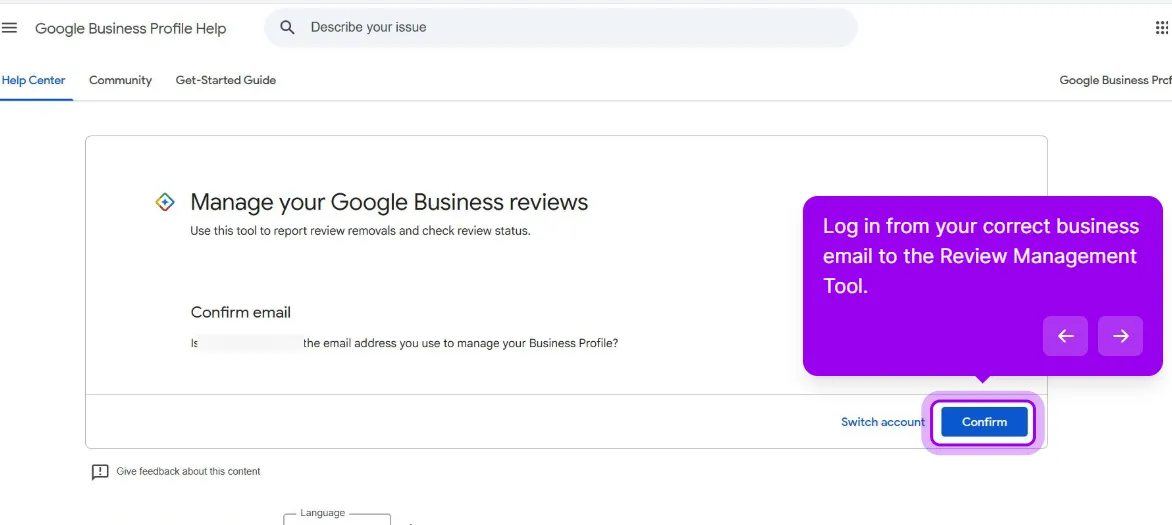
Open the Reviews Management Tool. Sign in with the account that manages the profile and pick the business.
Sign in with the account that manages the profile, then confirm the email before the tool loads your reviews.
The tool does three things.
It reports a review you have not reported yet. Same categories, same automated first pass.
The tool lists your recent reviews with a Report link on each row.
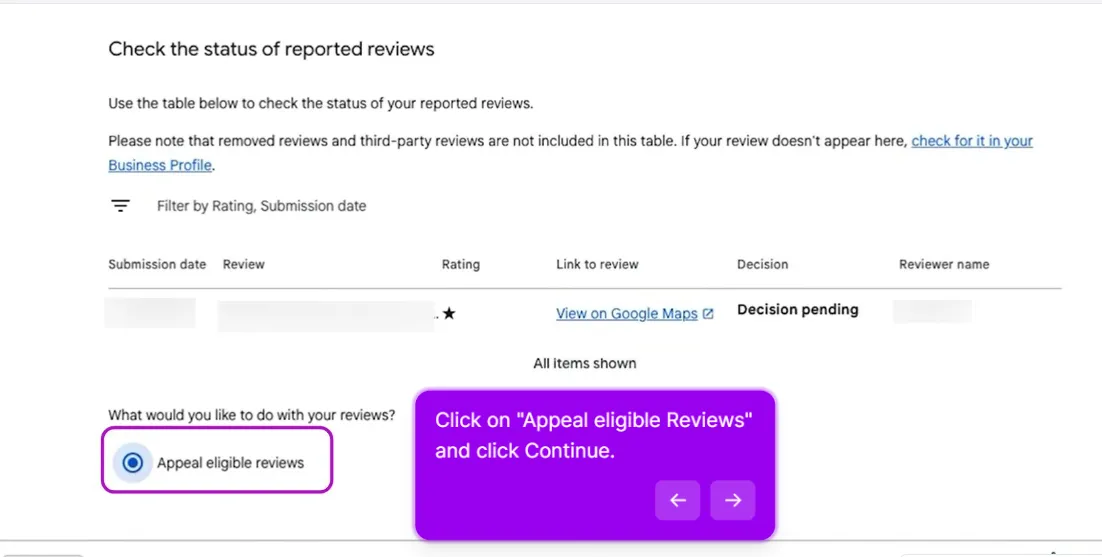
It shows the status of every report. Each reported review sits in one of three states: Reported (received, waiting), Escalated (passed on for further review), or Decision made.
Come back after about three days and pick the status option to see where your report stands.
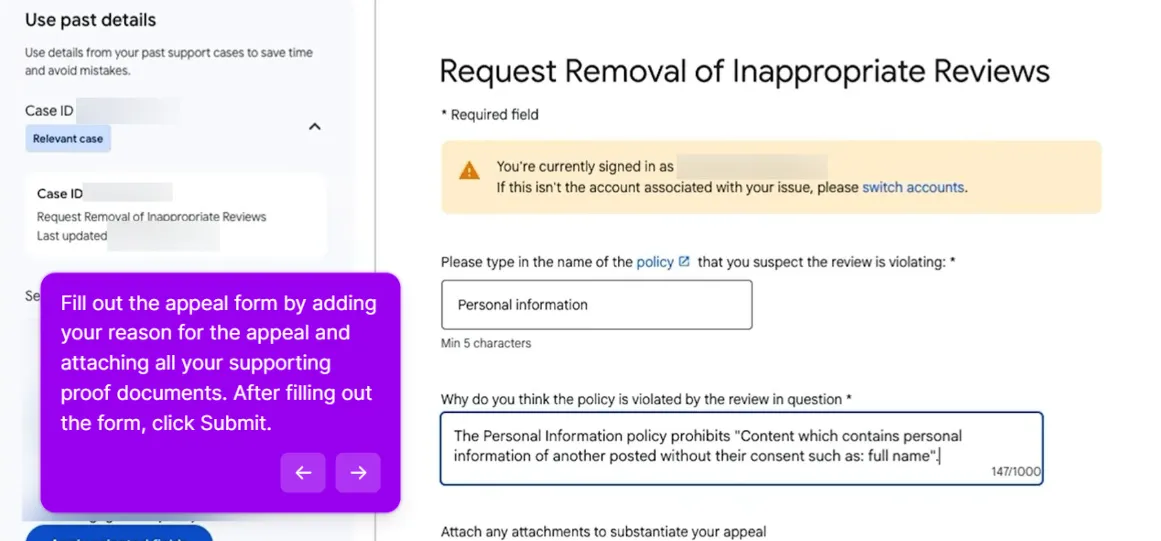
It takes your appeal. When a report comes back as Decision made with no violation found, the review becomes eligible for an appeal. You get one per review. Google does not offer a second.
The status table shows the decision on each report. Once one is eligible, Appeal eligible reviews appears below it.The appeal form asks you to name the policy and explain the violation, with room to attach supporting documents.
Because there is only one appeal, write it like a court filing: the policy clause, the numbered facts, the evidence. If your first report said “fake,” the appeal has to say why, in a way a stranger could verify in two minutes.
Google does not publish a timeline for appeals. Plan on several business days, and file nothing else about that review while it is pending. Parallel filings on the same review get treated as duplicates, and duplicates move slower.
3. Request a manual investigation
If the appeal comes back denied and the review genuinely violates policy, escalate to a manual investigation. Go to support.google.com/business/gethelp.
The flow:
Select your business.
In the search box, type “Fake text review removal request” and pick that option.
You will be routed to a form. Some users see an option to chat or email with support directly; others get only the form.
Include everything: the review link, screenshots, timestamps, your timeline of events, the Case IDs from steps 1 and 2, and a calm one-paragraph explanation of which policy clause is being violated.
The form goes to a human-ish reviewer, or at least a more thorough automated check. Expect a 3 to 5 business day response.
This is the step where most successful removals happen. It is worth investing 20 minutes in writing a clear, well-documented case.
4. File the extortion form if the reviewer demanded anything
If the reviewer has contacted you demanding payment to take the review down, or has threatened more bad reviews unless you do something, that is extortion. Google has a separate, fast-track form for it: support.google.com/business/contact/merchant_extortion.
Do not reply to the demand and do not negotiate. Screenshot every message with its date stamp and submit the form with full evidence. These get reviewed faster than standard reports because Google takes extortion seriously, both for liability reasons and because the pattern is easy to verify.
5. Use the legal route for defamation, harassment or a court order
Everything above asks Google to enforce its own policy. This step asks Google to act under the law, through a different process with a different standard. Google’s Report content for legal reasons troubleshooter walks you through picking the product (Google Maps, which is where Business Profile reviews live), the legal reason, and the specifics.
What it is for:
Defamation. A false statement of fact, not an opinion. “The food was cold and the staff were rude” is opinion. “The owner was arrested for fraud last year,” when he was not, is a factual claim you can disprove.
Harassment or threats aimed at a named person.
A court order you already hold that directs the content to be removed. This is the version with real teeth.
What to expect: it is slow, it is handled under the law of the jurisdiction you name, and it needs specifics. You will be asked for the exact review URL, the exact words you claim are unlawful, why they are unlawful, and which country’s law applies.
Vague submissions go nowhere, and Google will not decide who is telling the truth. In the US in particular, defamation requests without a court order almost never produce a removal, in our cases or in the community threads. Some other jurisdictions set a lower bar.
6. Post in the GBP Community for Product Expert escalation
If you have gone through steps 1 through 5 and the review is still there, the last in-system option is the Google Business Profile Community.
Post a new thread with your profile link, the review link, every Case ID from your prior attempts, and a clear, calm summary of what is wrong and what you already tried.
Product Experts are volunteers, not Google employees, but a small number of them can flag stubborn cases for review by Google staff. This is the slowest route, sometimes weeks, and for borderline cases it is the most effective one.
Do not post the same case multiple times. Do not tag specific Product Experts demanding help. Do not argue in the thread. Post once, with documentation, and wait.
Most denials at step 1 are recoverable through steps 2 and 3. If the manual investigation also comes back denied and your case really is policy-violating, you have one more move inside the system.
Go back to support.google.com/business/gethelp and re-file with new evidence that was not in your original case. Do not re-submit the same case. Google’s system flags duplicate submissions, and a flagged case moves slower, not faster.
New evidence means:
Additional reviews from the same reviewer on other businesses showing a pattern
Public information showing the reviewer is a competitor or former employee
Documentation that the service mentioned in the review is not one you offer (your menu, your services page)
Time-stamped evidence the reviewer was not physically at your location
If you do not have new evidence, write a calm public reply, get fresh five-star reviews to push it down, and move on. A 4.8-star average with 200 reviews including one bad-but-fair one will out-convert a 5.0 with 30 reviews.
Review removal services: what they can and cannot do#
Search “remove Google review” and half the results are companies offering to do it for you, usually “pay only if removed.” Here is what sits behind that offer.
What they can do:
File the same forms you have read about above. There is no back door and no paid tier of Google support.
Write a tighter case than you would. The court-filing skill above is what you are paying for.
Pick their battles. Pay-on-success pricing works because they screen for reviews that were always going to come down: obvious spam, personal information, a reviewer with a visible pattern. They decline the borderline ones.
What they cannot do: guarantee anything, remove a truthful bad review, or speed up Google. The 3 to 5 business day window is Google’s, not theirs.
What some of them do that puts your profile at risk:
Mass-flagging the review from a network of accounts. In our experience a dozen flags from unrelated accounts carry no more weight than one documented report from the owner, and the burst looks like manipulation with your profile attached.
Burying the review with purchased five-stars. That is the fake engagement policy applied to you. Google’s policy allows consequences for the business itself, up to restrictions on the profile, and purchased reviews tend to get filtered anyway.
Sending threatening legal letters to the reviewer on your behalf. Re-read the anti-SLAPP note above.
If you hire someone, ask which of Google’s forms they will file, what exactly they will write, and what happens to your money if Google says no. Vague answers mean you should file it yourself. The forms are free.
The other half of the search traffic for “delete a Google review” is people who wrote one. If you are the owner, keep these steps handy for the customer who agrees to update or remove a review after you fixed their problem.
On a computer, open Google Maps and sign in with the account that wrote the review. Then:
Click the Menu icon (three lines) in the top left.
Choose Your contributions.
Open the Reviews tab.
Find the review and click the three-dot menu next to it.
Choose Delete review, or Edit review to change the rating or the text instead.
In the Google Maps app the path runs through your profile picture, then Your contributions, then Reviews, then the same three-dot menu. Labels shift between app versions; the three-dot menu on the review is the constant.
Two rules for the owner. Fix the problem before you ask, because a customer who feels pressured tends to edit the review to say so.
And never tie a refund or a discount to deletion. Google’s policy prohibits discouraging or suppressing negative reviews, and a “we’ll refund you if you delete it” message is a screenshot waiting to be added to the review.
Replying to a year-old review. It was buried. Your reply pushed it back to the top of the profile, and now everyone sees it again. Leave old reviews alone.
Filing the same complaint six times. Google’s system flags repeat submissions. One filing per channel. Then wait.
Reporting under every category to see what sticks. One review, one accurate category. A mismatched category gets denied, and the denial sits on the record when you appeal.
Writing emotional copy in the appeal. Reviewers see hundreds of these a day. Calm and specific beats angry every time.
Skipping documentation. No screenshots, timestamps and review link in the manual investigation request means the reviewer cannot verify your case and will deny it.
The odds below are our honest read from the cases we run, not a Google figure. Google publishes no removal rates.
Option
When it applies
Typical time
Realistic odds
Dashboard report
Any review that fits a policy bucket
Within 3 business days, sometimes 24 hours
About 30% succeed here
Reviews Management Tool appeal
Denied report; one appeal per review
Several business days; no published timeline
Modest; works when the first report was thin and the appeal is specific
Manual investigation
Denied appeal, documentable violation
3 to 5 business days
Where most of our successful removals happen
Personal information report
Medical, financial, ID or private contact details exposed
Typically within 3 business days
Highest of any category; removed in most cases when you quote the text
Merchant extortion form
Reviewer demanded payment or threatened more reviews
Faster than standard reports
Strong with the messages, weak without them
Legal request
Defamation, harassment, or a court order you hold
Weeks to months, by jurisdiction
Low without a court order in the US; strong with one
GBP Community escalation
Steps 1 to 5 exhausted, borderline case
Days to weeks
Slow, but the most effective route for borderline cases
Ask the reviewer
Real customer, fixable complaint
Same day to a week
Depends on you fixing the problem; worth one calm attempt
Removal service
Any of the above, outsourced
Same as the form they file
Same as filing it yourself; a guarantee is a red flag
Reply and outbuild it
Any bad-but-honest review
Ongoing
Not a removal; the review’s weight drops as fresh reviews arrive
When to give up on removal and play the long game#
Sometimes a review is genuinely unfair but does not clearly violate policy. Sometimes Google denies a policy-violating review anyway. After 3 to 4 weeks of trying, you are probably done.
At that point, the strategy shifts:
Write a calm, professional public reply. You are not writing to the reviewer. You are writing to the next 500 people who will read this review when deciding whether to call you.
Focus on the 80% of customers who had a good experience and never thought to leave a review. They are your defense.
A single bad review on a profile with active, recent positive reviews has almost no effect on conversion. A bad review on a stale profile is poison. Removal is a one-time event; review velocity is a compounding asset, and it is the only option on this page that is entirely in your hands.
This post is one piece of a bigger playbook. The full guide covers the common Google Business Profile problems in one place, with the fix for each: The GBP cheat sheet.
Stuck on a specific case? We run the escalation for you, and you pay only if the review comes down. If the honest answer is that this one stays, we’ll say so.Get this review removed