
Of all the review removal categories, this is the one Google moves on fastest. A review that contains personal information about you, a staff member, or a third party tends to be the fastest category Google acts on. Google says review evaluation typically takes several days, and in our experience clear personal-information reports are among the more straightforward removals.
The reason is not goodwill. Google’s legal exposure for hosting personally identifiable information (PII) is high, especially under GDPR, CCPA, and HIPAA in healthcare contexts. They want it off the profile as much as you do.
The catch: you have to file it through the correct channel with the correct reason. Pick the wrong category and you are more likely to get a slow denial than a fast removal.
What actually counts as "personal information"
Google’s review content policy treats the following as PII when they appear in a review without consent:
- Medical information. Specific diagnoses, treatments, prescription details, or health conditions of a named individual.
- Government ID numbers. SSN, driver’s license, passport, Aadhaar, or any national ID.
- Financial account information. Credit card numbers, bank account numbers, even partially redacted ones.
- Home addresses. A reviewer’s home address or someone else’s. (Business addresses are fine.)
- Personal phone numbers. A staff member’s personal cell, or a customer’s personal number. (Business phones are fine.)
- Personal email addresses. Same logic.
- Photos that expose identity. Photos of a person taken without their consent in a private context. If the image was uploaded to your profile’s photo gallery rather than attached to a review, it goes through the photo flow instead: how to remove user-contributed photos.
What doesn’t count as PII (so don’t file under this category):
- Staff member’s first name appearing in a review (“Jenny was rude”). That’s a regular review.
- The reviewer mentioning their own name. They’re consenting to that disclosure.
- The business’s own published contact information.
- A reference to a service or treatment without specific medical claims (“I came in for a cleaning” is fine; “Jane Smith was treated for hepatitis” is not).
If you’re unsure whether something qualifies, the test is: would the information identify a specific individual in a way they didn’t consent to? If yes, file. If borderline, file with explanation.
The exact filing process
The click-by-click walkthrough at the top of this post shows the same flow, click by click. The written steps and screenshots follow.
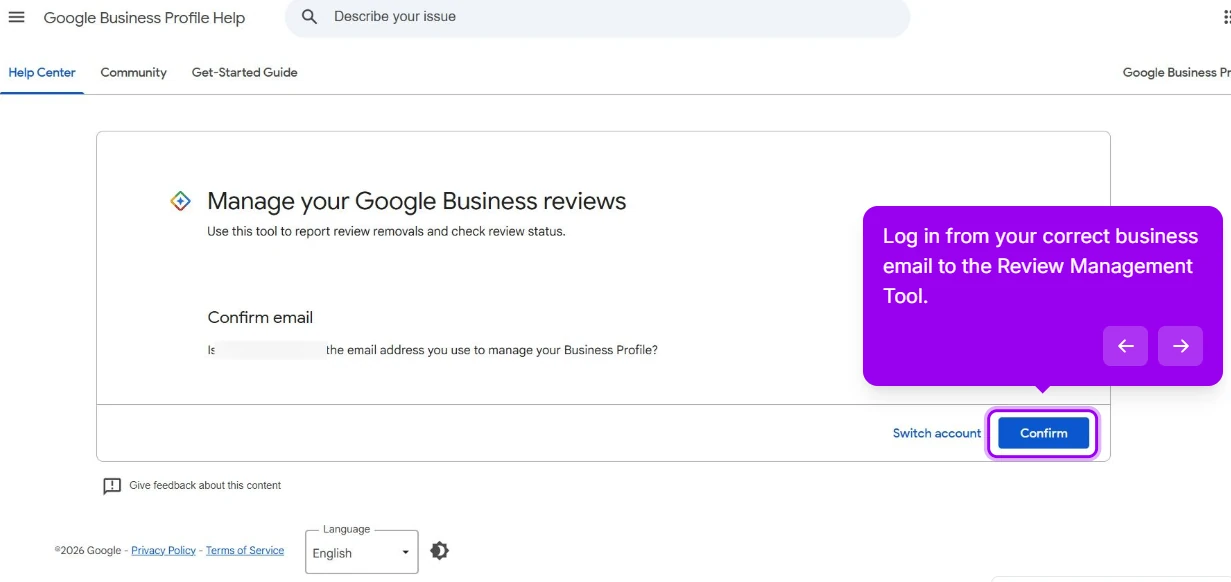
Step 1: Open the Review Management Tool
Sign in to Google’s Review Management Tool with the email you use to manage your Business Profile, confirm the account, and find the review in the list.
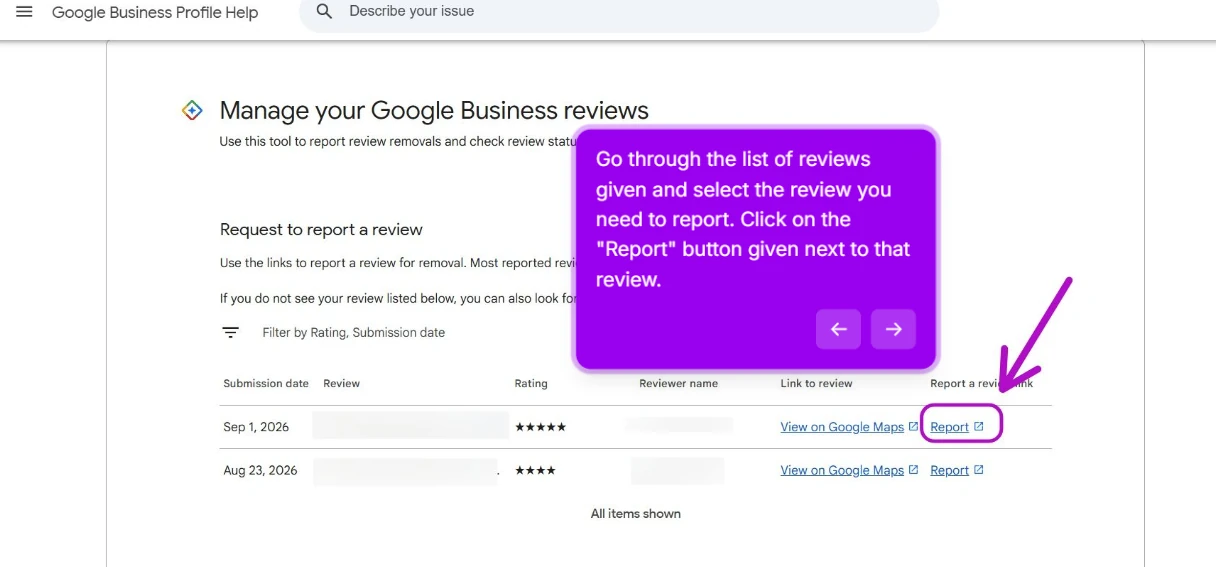
Step 2: Click Report next to the review
The tool lists your reviews by submission date, rating and reviewer. Find the one that exposes personal information and click Report beside it.
Step 3: Choose the reason "Personal information"
Pick the most accurate reason: Personal information. Not “Spam,” not “Off-topic.” Reporting under the reason that actually matches the violation gives the report the best chance of a clean removal.
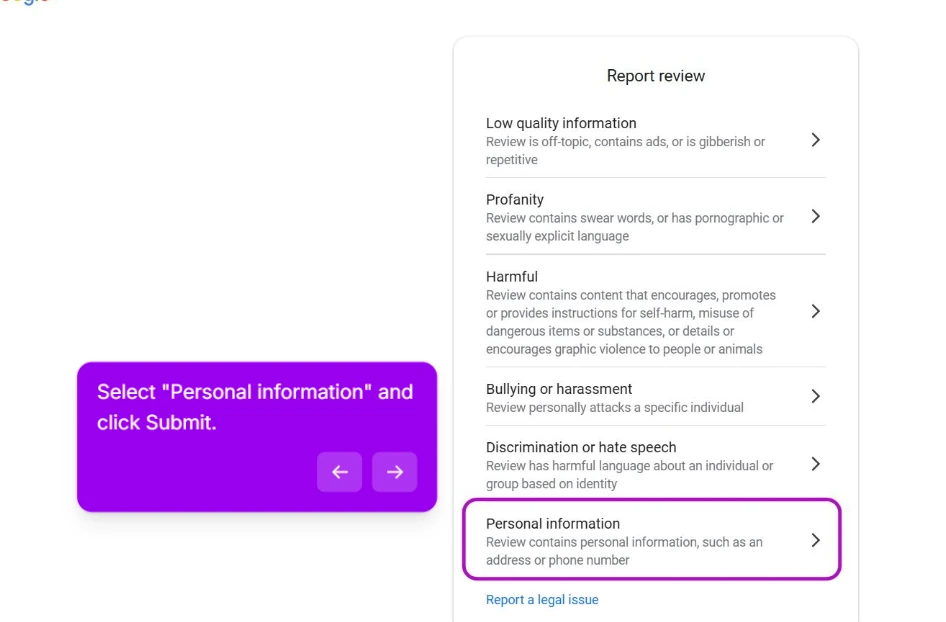
Step 4: Submit and track the status
Submit. Google logs the report and assesses it, and you can track the status in the same Review Management Tool.
That’s it for the standard path. Google says evaluation typically takes several days. In our experience a clear personal-information report is one of the more reliable removals, though Google never guarantees an outcome.
When the first report is denied
Some personal-info reports come back denied, often when the PII is not obvious from the review text alone or the report did not spell out clearly enough what the personal information is.
If denied, you get one appeal. The same tool also lets you appeal a report that has sat at “Decision pending” for more than 3 days (Google’s own screen says so). Here is the one-time appeal, step by step.
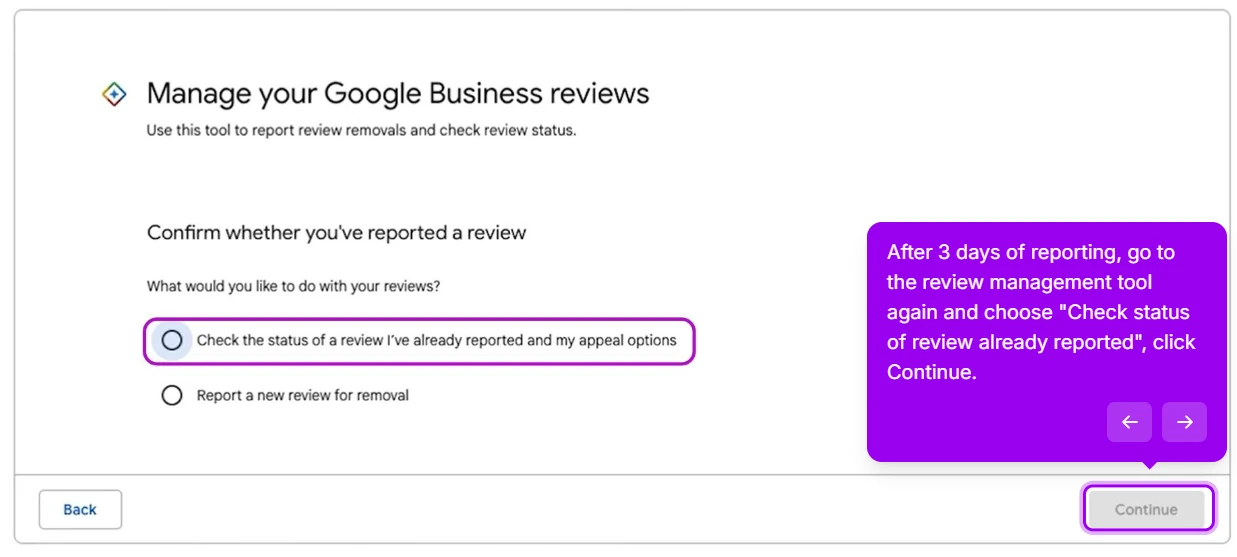
Appeal step 1: Check the status of the reported review
Go back to the Review Management Tool and choose Check the status of a review I’ve already reported and my appeal options. Click Continue.
Appeal step 2: Select "Appeal eligible reviews"
Below the table of reported reviews you will see the option Appeal eligible reviews. Select it and click Continue.
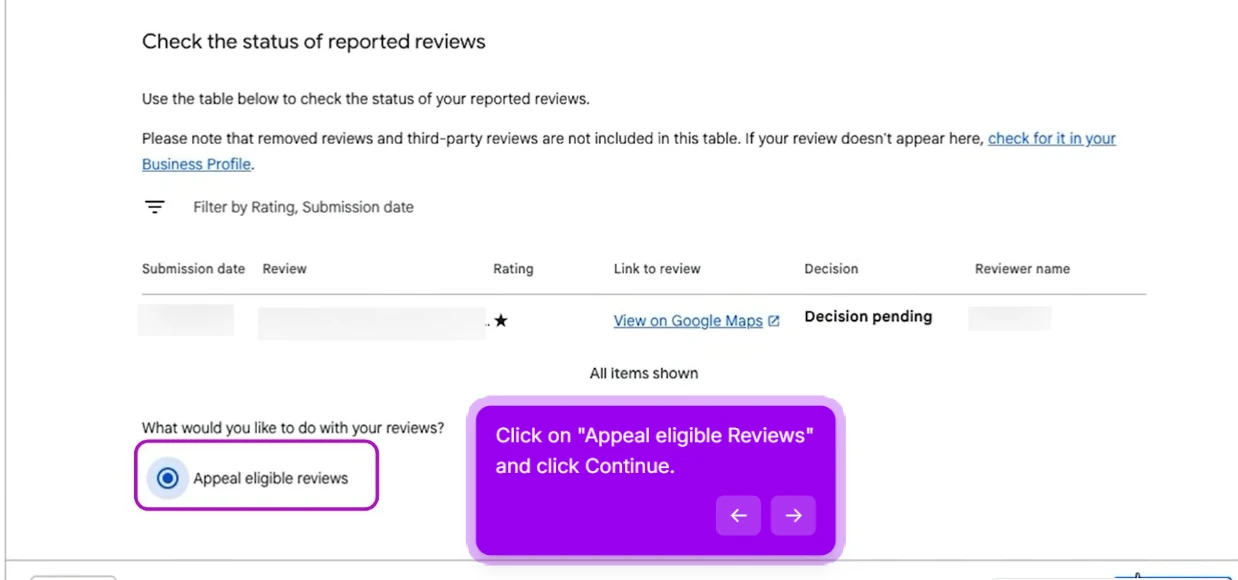
Appeal step 3: Tick the review you want to appeal
Select all the reviews you want to appeal, then click Continue.
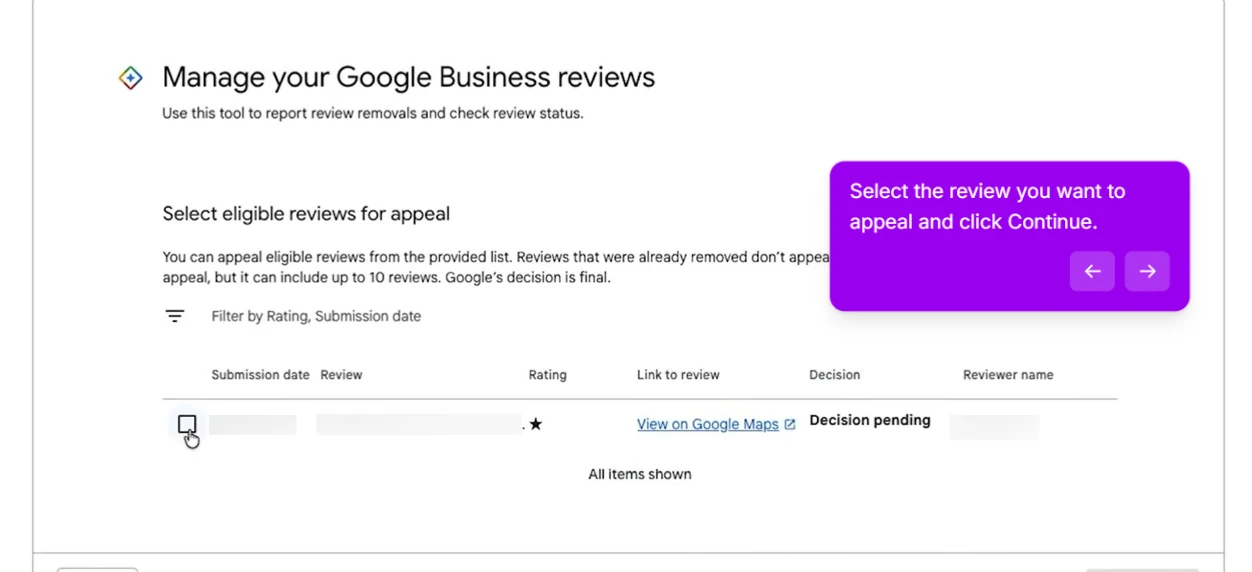
Appeal step 4: Click "Submit an appeal"
Confirm the reviews you are appealing, then click the Submit an appeal link.
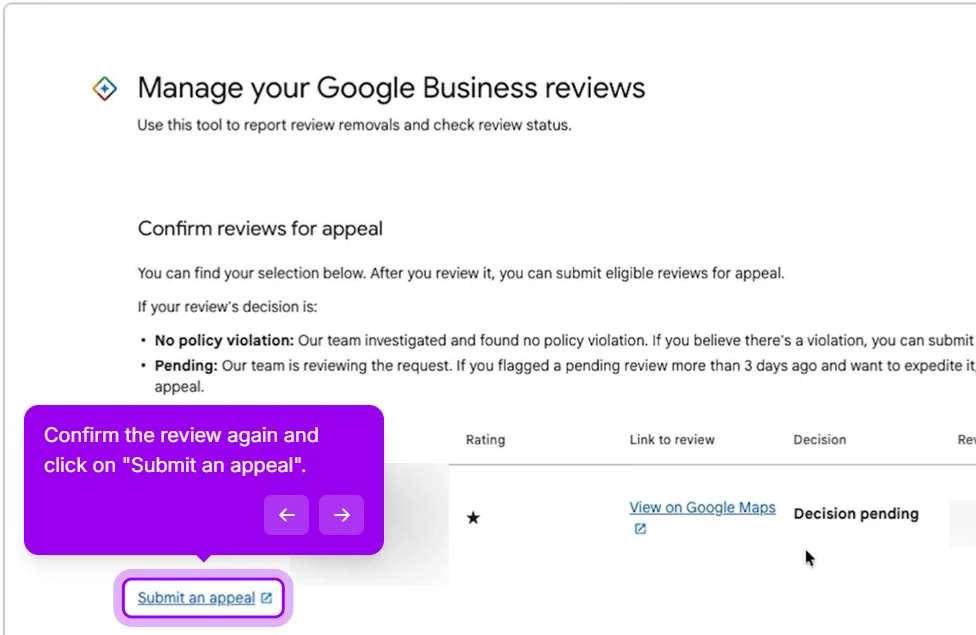
Appeal step 5: Fill in the appeal form
Fill out the appeal form. Name the policy (Personal information), state the precise problem as shown in the screenshot, quoting the offending text and saying what kind of PII it is, and attach all your supporting proof documents. Then click Submit.
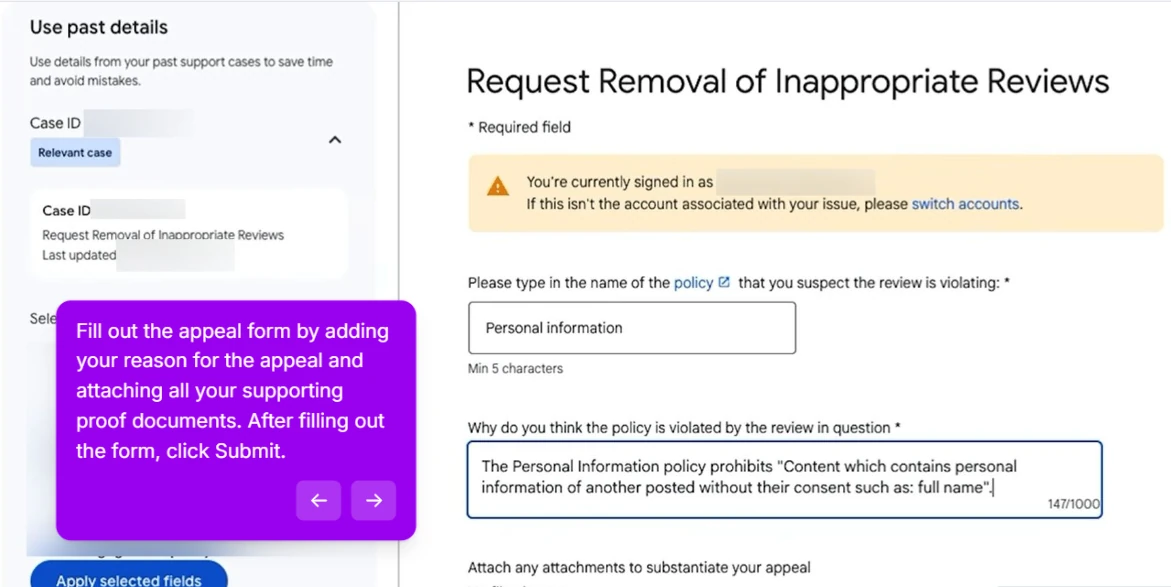
After submitting the appeal, you get an email with your Case ID. Manual review usually takes additional time. In our experience a well-documented appeal that quotes the offending text is rarely denied, though Google does not guarantee a result.
For healthcare practices specifically
Understanding HIPAA in healthcare is key. The Privacy Rule applies to medical practices and their partners, but it doesn’t limit patients from posting reviews. This means HIPAA won’t help you take down a review or hold Google accountable for it. If you want to remove a review, focus on “personal information” instead. Where HIPAA does matter is your own conduct: a covered entity must never confirm or disclose protected health information in a public reply, even to correct the record. That’s the trap most practices fall into.
In that case:
- File the standard "Personal information" report.
- Simultaneously, document the review for your HIPAA compliance file.
- Do not respond publicly in a way that confirms the person was a patient or discloses any treatment detail.
- Loop in your healthcare attorney for your own compliance and response strategy, and to advise on any other legal removal avenues via the legal removals form. Engage counsel for compliance, not as a HIPAA takedown theory aimed at Google.
For most reviews the standard report does the job. The point of involving counsel is protecting the practice’s own compliance, not pressuring Google.
What not to do
- Don’t reply to the review naming the PII in your response. That spreads the disclosure further. Reply briefly: “We’ve reported this review to Google for containing personal information and will respond to the underlying feedback once it’s removed.”
- Don’t contact the reviewer to demand they edit it. Some platforms allow this, but on Google it usually ends with the reviewer adding more specifics in retaliation.
- Don’t file a different category first ("Spam" or "Off-topic") in the hope it gets removed faster. The reverse is true: PII reports are the fastest category at Google.
The 24-hour rule
If the PII in a review is sensitive (medical, government ID, or financial information), file a removal request within 24 hours. The longer it stays public, the greater the exposure risk, and cached copies on other sites become harder to remove than the original review. For everything else (home addresses, personal contact info), within a week is fine.
Filing inside a day only works if someone sees the review the day it lands. Our review service sends an alert for every new review, so a problem one reaches you the same day.
This article is general information, not legal or medical advice. Always file through Google’s official channels, and consult your own attorney or compliance team for HIPAA and other regulatory questions. Removal outcomes are decided by Google and are not guaranteed.
This post is one piece of a bigger playbook. The full guide covers the common Google Business Profile problems in one place, with the fix for each: The GBP cheat sheet.
Got a review with personal details you can’t get removed? We run the escalation for you, and you pay only when it comes down. Remove my private details


