
Imagine a competitor ranks above you in the local 3-pack, but their address is an empty trailer, a residential garage with no signage, or a UPS Store mailbox. This violates Google’s policies. You can report them with solid evidence, though outcomes and timelines are not guaranteed.
What counts as an address violation
Google’s Guidelines for representing your business require:
- A physical address with permanent fixed signage
- Staffed during stated business hours (someone is actually there when the listing says they’re open)
- Operates from that address as a primary place of business
Service-area businesses (plumbers, mobile repair, cleaners) must:
- Hide the address on their listing (it should not show publicly)
- Operate as a "Service-Area Business" rather than a storefront
Common violations you can report:
- Vacant lot or empty trailer listed as a business address
- Residential address with no business signage, displayed publicly (instead of hidden as a service-area business)
- UPS Store / private mailbox listed as a storefront
- Shared office or coworking space listed as a dedicated business location
- Multiple businesses at the same address that obviously share the same setup (often the same owner gaming the system with shell businesses, which is different from the duplicate listings a single business ends up with by accident)
- Address that doesn’t exist (verifiable via Google Street View showing nothing there)
What doesn’t count:
- Storefront with bad parking or hard-to-find entrance
- Older signage that doesn’t match the business name (signage update lag)
- Small shops that happen to be near competitors
Worth checking your own profile against the same list before you file. Addresses are the most common suspension trigger we see, and the GBP suspension check scores your setup against that one and five others.
Step 1: Document the violation
Drive to the address. Take photos of:
- The exterior of the location showing what’s actually there
- Any signage (or lack thereof)
- Street view from multiple angles
- The mailbox or door (if a private mailbox is being used)
Date and timestamp the photos. Your phone camera does this automatically; just don’t edit the photos before reporting.
Bonus: a Google Maps Street View link to the address showing the location confirms the photos are real.
Step 2: Report the business on Google Maps with Suggest an edit
The fastest path is the public “Suggest an edit” flow.
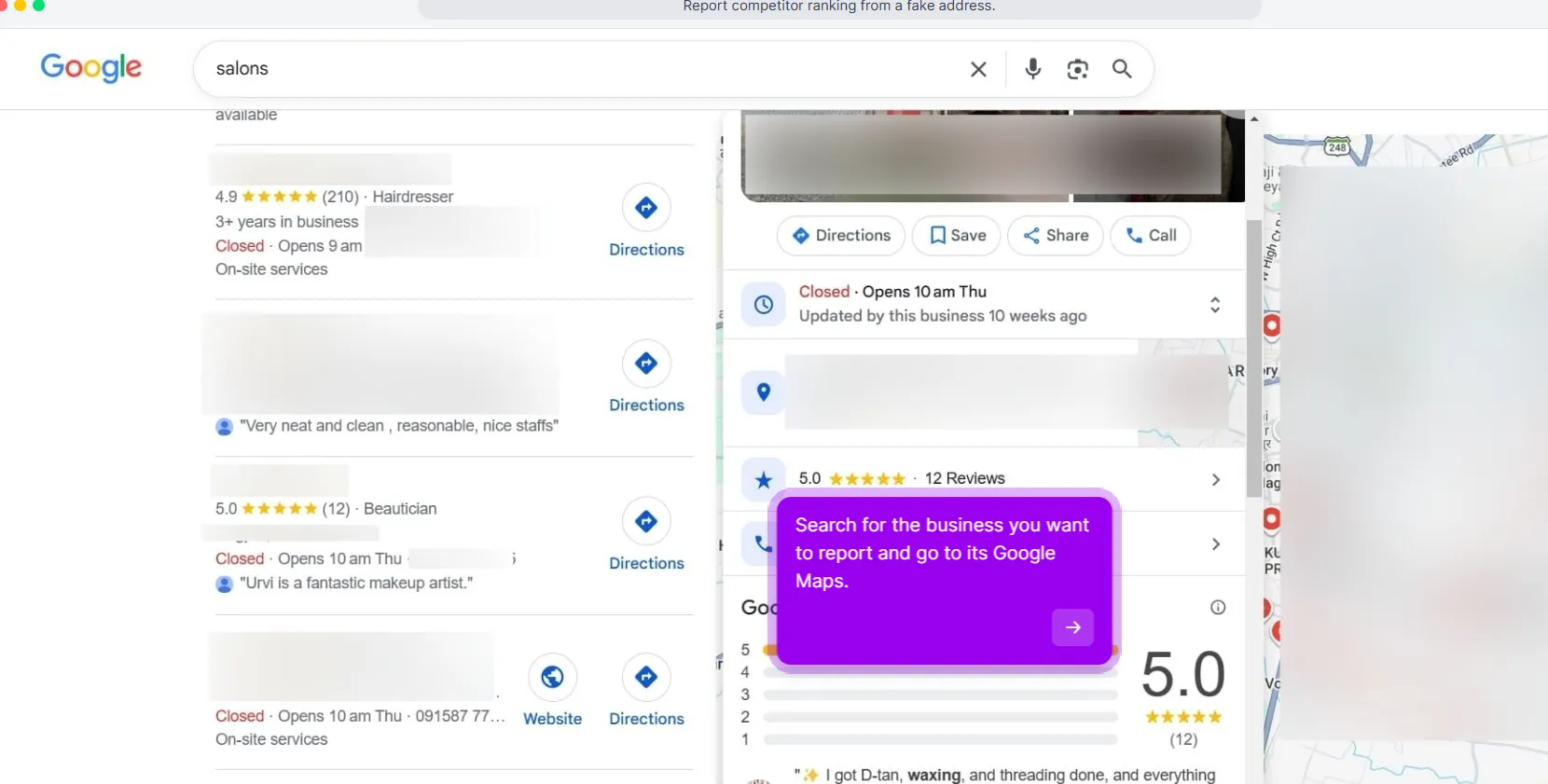
1. Open the competitor’s listing on Google Maps. Search the business name, then open its place page.
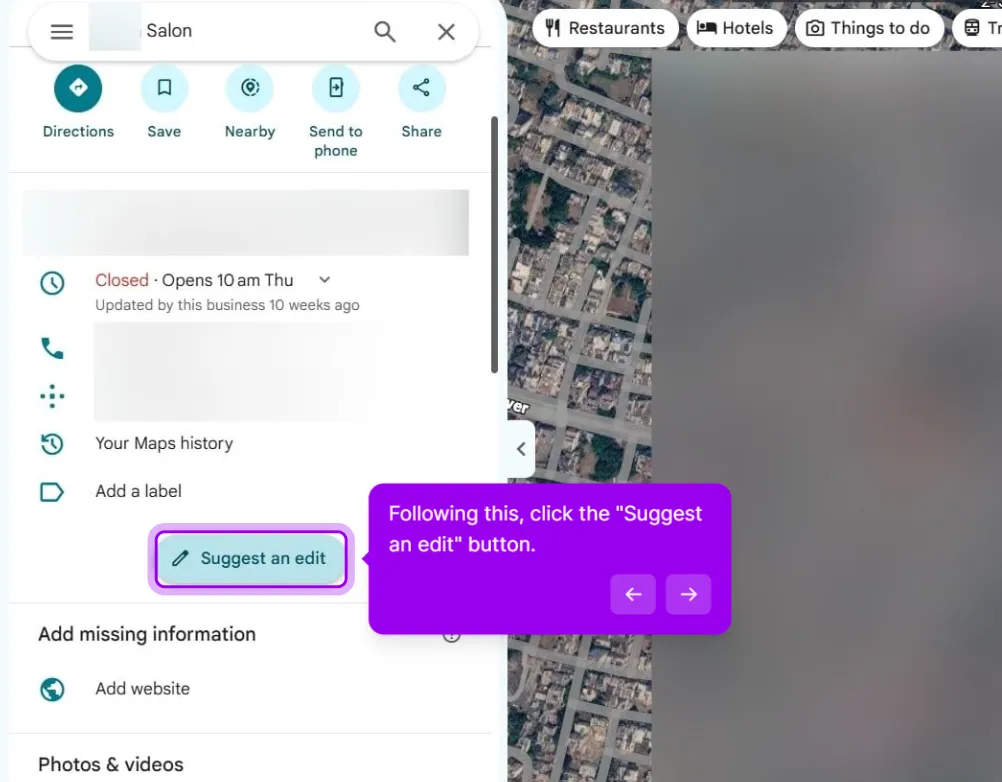
2. Click Suggest an edit. It sits in the left panel, under the hours, phone number and Add a label rows.
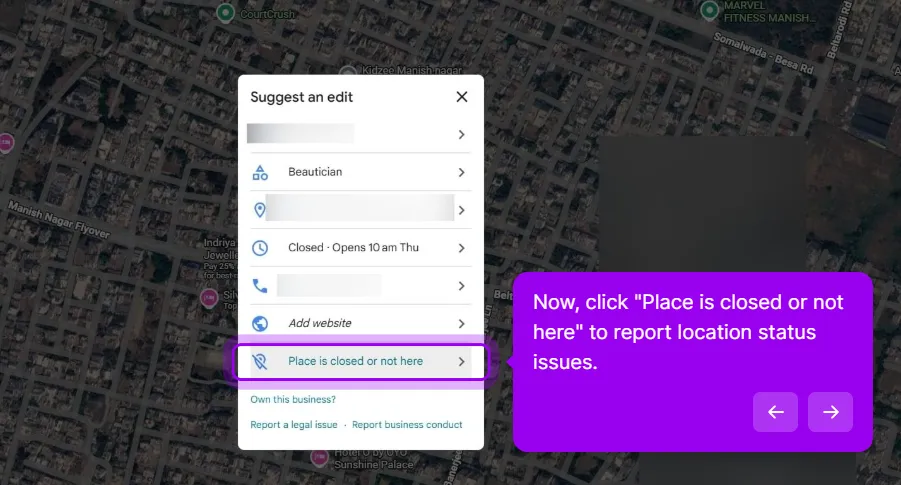
3. Choose Place is closed or not here. This is the row that covers location status problems, including a private mailbox or a residential location displayed publicly.
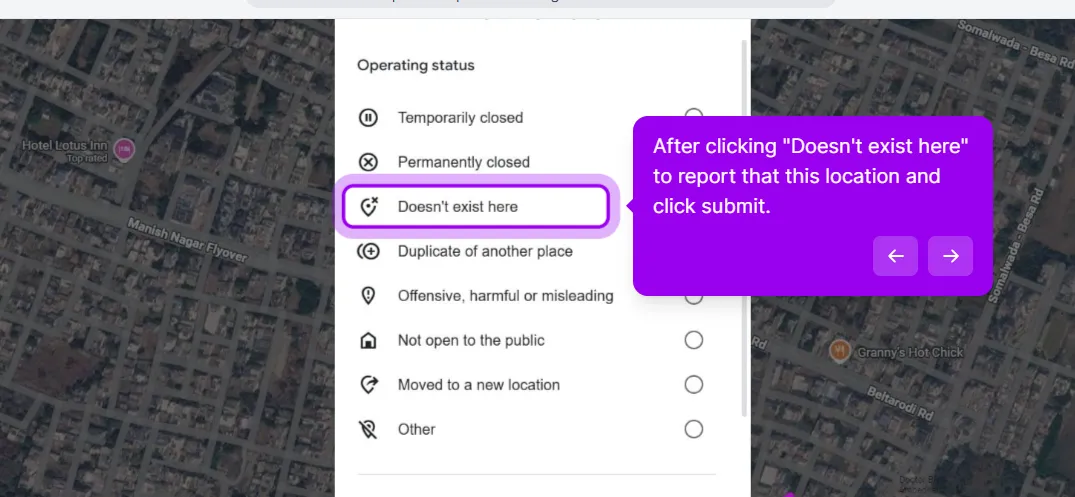
4. Pick the status that matches. Choose Not open to the public when the address is a private mailbox or a home shown publicly. Choose Doesn’t exist here when there is no business at the address at all, such as a vacant lot or a demolished building.
5. Add a brief note and submit.
Google reviews suggested edits typically within a few days. A well-documented edit may lead to a listing being modified or removed, but approval isn’t guaranteed, and Google doesn’t disclose success rates. This step alone isn’t sufficient; you’ll likely need to follow up with step 3 for better results.
Step 3: File the Business Redressal Complaint Form
Go to the Business Redressal Complaint Form and fill out the following:
- Your name and contact info
- The competitor’s Business Profile (URL or business name + address)
- Category of violation: address-related, name keyword stuffing, multiple businesses at same address, etc.
- A description of the violation
- Photographic evidence (this is required)
For photos, attach the documentation you gathered in Step 1. The more concrete the evidence, the better. The same form is where you go when a competitor is sabotaging your own profile, for example by reporting photos that don’t belong on your listing.
A sample description you can adapt (fill in the real business name, address, and date):
“[Business name] is listed at [address] as a storefront. The address is a vacant lot with no signage, building, or staff. Attached photos taken on [date] show the lot. Their listing claims storefront hours of operation. This violates Google’s guidelines requiring permanent signage and staffing during stated hours.”
Submit. Google’s spam team reviews these manually. Google does not publish a response-time commitment, so expect anything from a few days to several weeks, and some reports go unanswered.
What actually happens after you submit
Google’s response is one of three:
- Listing removed or significantly modified. A common outcome for clear violations backed by photo evidence. Once Google acts, the change to Search and Maps usually follows fairly quickly.
- Address hidden. For residential or service-area businesses, Google may just hide the address rather than remove the listing. The competitor stays but loses the geographic advantage.
- No action taken. Happens when the violation is borderline or the evidence wasn’t strong enough.
If no action is taken and you have stronger evidence, you can re-file the report. Re-file only when you have genuinely new evidence rather than resubmitting the same case over and over.
When to escalate to the GBP Community
If a clear violation has been ignored after both the suggested edit and the redressal form, post in the GBP Community with:
- The competitor’s profile link
- Your photo evidence
- Confirmation numbers from your previous reports
- A factual description of the violation
Stick to the facts of the violation and the evidence. Product Experts can flag a clear, well-documented case for internal review by Google’s spam team.
Things to avoid
- Keep reports factual and evidence-based. Describe the violation and attach the evidence; let the documentation speak for itself.
- Avoid reporting every borderline competitor. Frequent weak reports can undermine your credibility. Focus on clear violations with strong evidence.
- Don’t falsify evidence. Photo editing or staged photos can be detected. Falsified reports can result in your own listings being penalized.
- Expect the same edits to be filed against you. A competitor can suggest “Doesn’t exist here” on your listing too, which is one of the ways Google ends up showing your business as permanently closed.
- Don’t expect quick ranking gains. Shifts take time, and competitors fill the gap quickly. Focus on optimizing your Maps presence so your profile is the one that takes the available slot.
When the violation is genuinely a grey area
Some businesses operate legitimately from non-standard setups:
- A real plumber with a real address but no walk-in storefront
- A consulting firm at a private executive suite that’s a real address but in a coworking building
- A retail shop with seasonal hours that’s closed during your visit
If you’re not sure whether something violates policy, don’t report it. Save the redressal form for clear violations. False reports against legitimate businesses hurt the reporting system’s credibility and don’t help you.
The clearest indicator: would a normal customer find an actual business at that address during the listed hours? If yes, leave it alone. If no, you have a real case.
This post is one piece of a bigger playbook. The full guide covers the common Google Business Profile problems in one place, with the fix for each: The GBP cheat sheet.
Got a competitor address violation that won’t come down? We file every report for you, and you pay only when Google takes the listing down. Remove the fake listing


