
Someone reported your business as closed, and Google updated the listing without asking you. A “Permanently closed” label is a data edit, the same kind that changes your hours, and you can usually reverse it yourself in about 10 minutes.
The honest read: this is one of the few Google Business Profile problems that gets fixed in one sitting for the large majority of owners. The catch is that it sometimes comes back, and the reason it came back is the actual problem. This post covers both.
First: which kind of closed is it?
Three situations are described as “Google says my business is permanently closed.” They have three different fixes.
- Permanently closed. A red label under the business name on Search and Google Maps. The listing stays, but it falls out of local results, and calls decline quickly as searchers read the label and pick the next result. This post handles this case.
- Temporarily closed. A different status with a different label. It keeps the profile and the reviews, which makes it the right choice for a renovation or a seasonal shutdown. If you set it in January and forgot, the fix is the same status control below.
- Gone entirely. No label, no listing. That is a disappeared profile, usually an account or identity problem with its own recovery path: how to get a disappeared profile back.
How to mark your business as open again
This is how to remove the permanently closed label on Google and reopen the business from your side. It assumes you can sign in to the account that manages the profile. If you cannot, step 1 covers that. The click-by-click walkthrough at the top of this post shows the same clicks; the written steps and screenshots follow.
1. Open the profile you actually manage
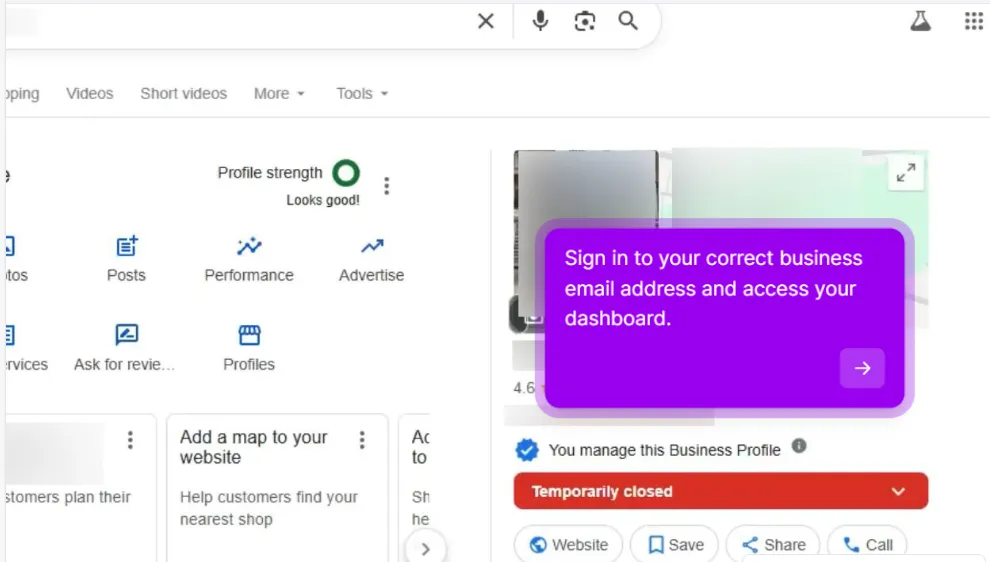
Sign in to the Google account that owns the profile, then search your business name on Google or go to business.google.com. You should see an edit panel with your business name at the top, and the public listing beside it.
If Google shows Own this business? instead, you are viewing a listing you do not control. Claim it, or request access from whoever verified it. If the profile is unverified, complete verification first. Nothing below works from the outside.
2. Find the status setting under Hours
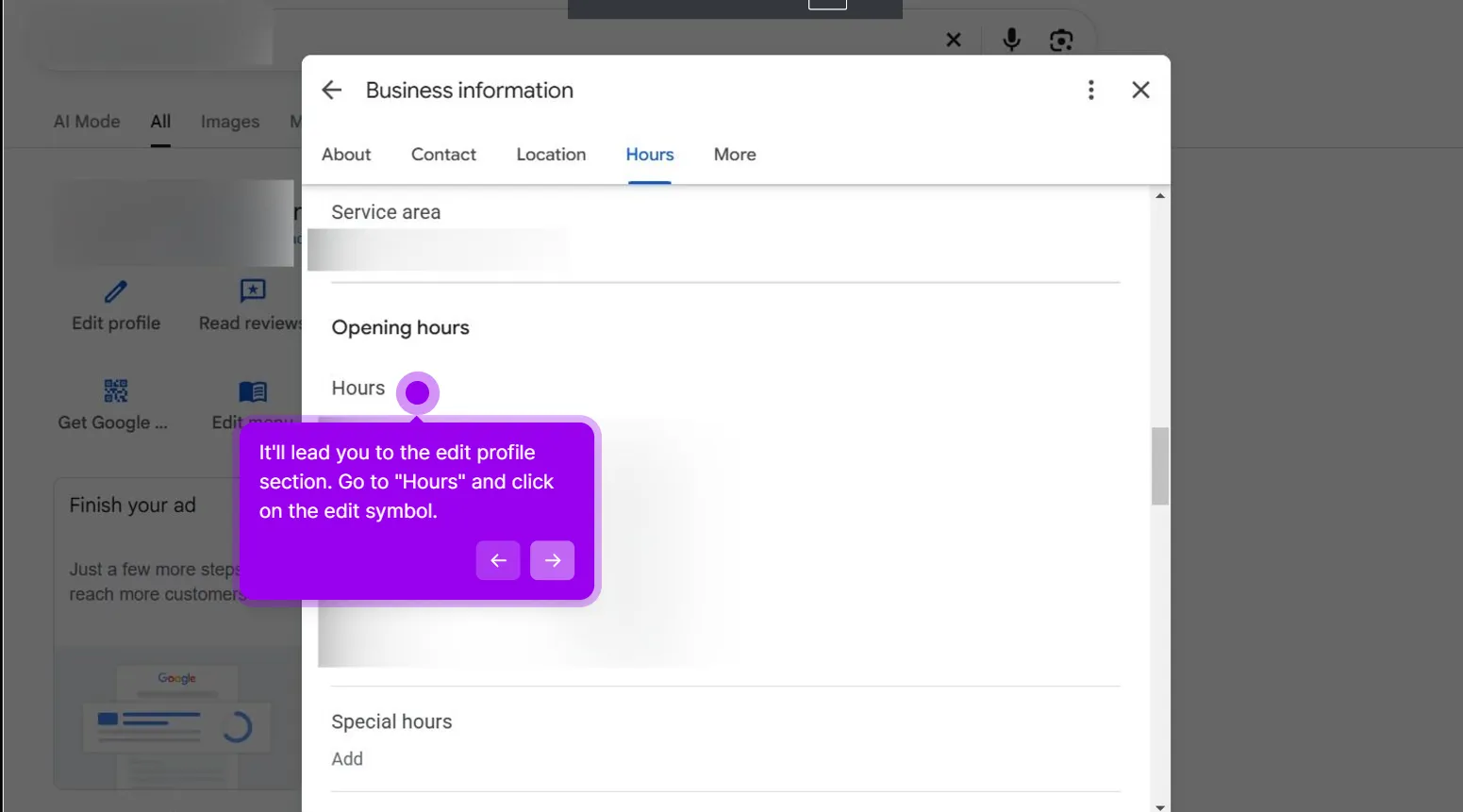
Click Edit profile and open Hours, usually found under Business information. The status control there reads Permanently closed. Some owners see a direct Mark as open prompt on the dashboard instead, which is the quicker route; if you see it, use it. Same setting, fewer clicks.
3. Switch the status to Open with main hours
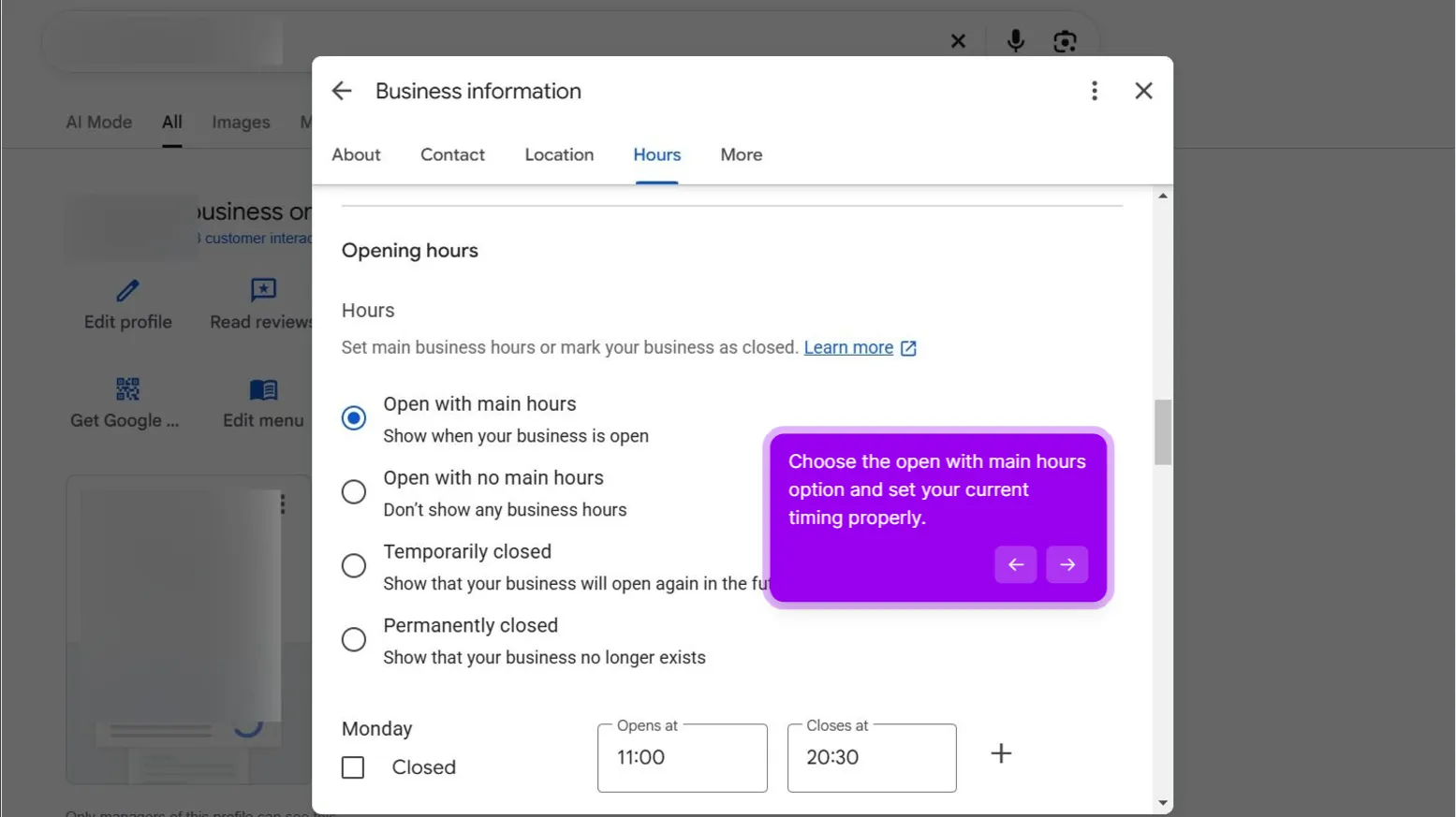
Change the status to Open with main hours and check that the weekly hours underneath are still correct before you save.
Do not pick Temporarily closed as a stepping stone. It still says the place is closed, it still tells searchers not to come, and it buys you nothing.
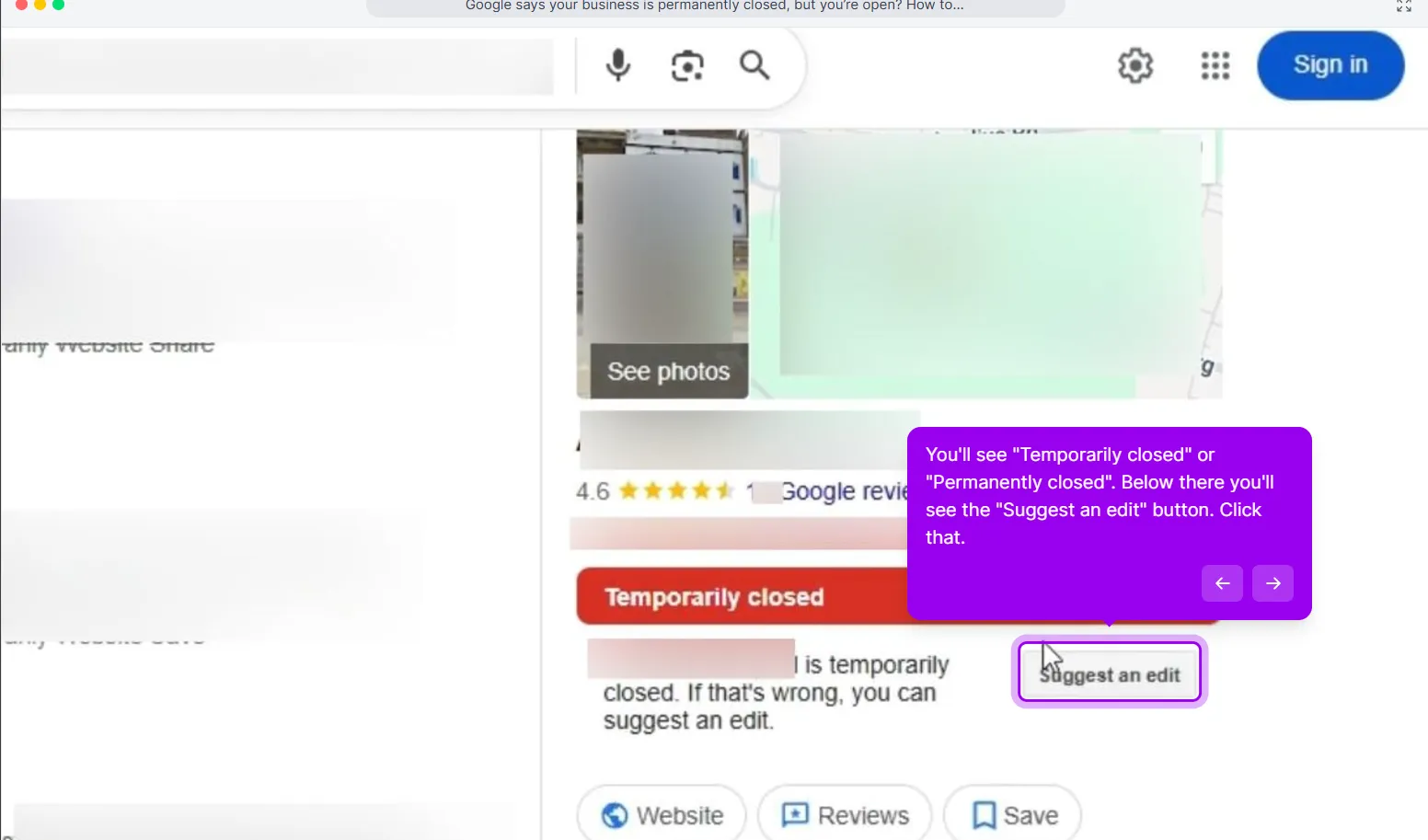
Before you save, take a screenshot of the public listing showing the red label and today’s date. If the label comes back, you have dated evidence of a repeat, and support responds better to “closed on the 3rd, reopened on the 3rd, closed again on the 9th” than to “this keeps happening.”
4. Check the public listing from a signed-out window
Search your business name in an incognito window, then on Google Maps. Your signed-in view can run ahead of what searchers see, so the signed-out check is the one that counts. The label typically clears within hours and occasionally takes a few days. Write down the date.
That is the whole play. In our cases the owner-side reversal holds the first time for the large majority. If the label returns, keep reading.
If Google flips it back to closed
The label came back within days. Something is still feeding Google the closed signal, and re-flipping the switch every morning is not a strategy. Two causes cover nearly every stubborn case we have seen.
A closed duplicate is merged with your listing. Somewhere on Maps there is a second listing for your business, from before a rebrand, a previous owner or an employee. It was marked closed, Google recognized it as the same place and merged the two, and the closed status can win that merge. Search your name and address on Maps and look for a second pin. If you find one, the duplicate is the problem, not your status setting: how to remove a duplicate Google Business Profile.
Someone keeps submitting the edit. A competitor, an ex-employee, a customer with a grudge. Google does not show you who suggested an edit, so do not spend the afternoon guessing. Outweigh them instead, in this order:
- Fix the status from the dashboard again. Every time. The owner setting is the strongest single input you control.
- Contact support with evidence. Go to support.google.com/business/gethelp, select the business, and attach photos of the open storefront with signage visible, a recent dated receipt or utility bill for the address, the listing link, and the dates it flipped. Google does not publish a turnaround, so give it several business days before following up.
- Ask real customers to correct it on Maps. A handful of genuine customers, on their own phones, using Suggest an edit to mark the place open. Several independent confirmations help. Do not stage it and do not pay for it.
- Keep the profile visibly alive. Post photos, update holiday hours, answer waiting questions. An active profile contradicts a closed signal in a way a quiet one cannot. That weekly upkeep is the core of our Google Business Profile management.
- Escalate if it keeps flipping. After two support rounds with no change, post in the Google Business Profile Community with the listing link and your case IDs. Product Experts there can sometimes flag a stuck case for Google staff.
The support message does not need to be long. It needs dates.
“Smith’s Hardware, 1234 Main Street, Austin TX 78701, has operated continuously at this address since 2011. The listing was marked Permanently closed on [date], reopened from the owner dashboard on [date], and marked closed again on [date]. Attached: storefront photo dated [date], utility bill dated [date], listing link. Requesting review of the repeated closed edits.”
If you moved
Moving is neither closed status. Not permanently, not temporarily. You change the address on the existing profile and keep everything: reviews, photos, ranking history. Google may ask you to verify again after an address change. That is normal, and far cheaper than starting over.
The self-inflicted version: the owner moves, marks the old listing closed because it felt tidy, creates a new profile at the new address, and the new one stalls in verification. Google now shows one listing, and it is the closed one, with all your reviews on it. In the cases we have handled, the cleanest unwind is to reopen the original, change its address, and treat the newer profile as the duplicate to clean up.
The one time a closed status is correct is when a location genuinely shut. If you closed one branch of three, mark that branch closed and leave the others alone. The sequence is in how to mark a Google Business Profile permanently closed.
What not to do
Each of these feels reasonable in the moment. Each one makes it worse.
- Creating a new profile. Two listings for one business, one marked closed, and your reviews are on the closed one. Google tends to treat the pair as duplicates, and the closed status can win the merge.
- Marking it Temporarily closed as a workaround. Still closed. Still tells searchers not to come. Go straight to Open with main hours.
- Arguing with the reviewer who said you closed. Reply once, calmly, with your hours. Do not accuse them or the competitor you suspect. Edits and reviews are separate systems, and the next customer reads your tone, not your case.
- Waiting for it to fix itself. In our experience closed listings do not drift back to open on their own. Every day at the closed status is a day of calls going to the result below you.
How long until calls come back
Two clocks are running.
The first is the label. Once you save, the red label typically clears from Search and Maps within hours, sometimes a few days. Check from a signed-out window, not your own dashboard.
The second is the calls, and it is slower. While the listing was closed it dropped out of local results, and Google does not restore that visibility the moment the label goes. In our cases calls climb back over days to a few weeks rather than the same afternoon, and the longer the label was live, the longer the tail. Treat this as an honest range, not a promise; Google does not publish a timeline for any of it.
If the label is gone and two weeks later you are still not appearing for the searches that used to bring you calls, that is no longer a status problem. It is a visibility problem with its own diagnostic: why your business is not showing up on Google.
When this is a suspension in disguise
One last check. Some owners get here because a customer said “Google says you’re closed” and nobody looked at the dashboard. Open it and look for a suspension notice. If one is there, you are not dealing with a closed status at all, and flipping the status is wasted time.
The tells are different. A closed label leaves the profile editable and the reviews public. A suspension puts a notice in the dashboard and usually removes the listing from Maps entirely. If the status option is not there to change, stop flipping switches and start gathering documents: how to recover a suspended Google Business Profile. Our suspended-listing recovery service handles that path end to end. To work out which guideline is likeliest to be behind it before you write the appeal, run the GBP suspension check.
This post is one piece of a bigger playbook. The full guide covers the common Google Business Profile problems in one place, with the fix for each: The GBP cheat sheet.
Fixed it twice and it keeps coming back? We take the case over, paid upfront and refunded in full if the profile does not show open again. Remove the closed label


