
A two-star review was received on Friday, but when checking on Monday, the Reply button was greyed out because the profile was being viewed as a customer, not as an owner. The listing, set up in 2019 by a former office manager who left in March, had no login left that anyone in the business could use.
Access to a Google Business Profile is tied to Google accounts, not to the business. If the primary owner role is linked to a departed employee’s account, you can’t respond to reviews. This post covers handovers, managers, and requesting access from an owner who is unreachable rather than unwilling. If the person holding the profile will not cooperate (an ex-spouse, ex-agency or ex-employee), that is a different play: getting ownership back from someone who will not hand it over.
Roles, and which one you actually need
Google My Business, as most owners still call it, has three roles.
| Role | Can do | Cannot do |
|---|---|---|
| Primary owner | Everything an Owner can, plus transfer primary ownership | Leave the profile until someone else holds primary ownership |
| Owner | Edit everything, reply to reviews, add and remove people, remove the profile | Take primary ownership away from the primary owner |
| Manager | Edit most of the profile, reply to reviews, publish posts | Add or remove people, change roles, or remove the profile |
Which one you need:
- The business holds Primary owner, through an account it controls rather than someone’s personal Gmail.
- A second trusted person (a partner, a general manager) holds Owner, so one lost password never locks everyone out.
- Everyone else, including every agency you ever hire, gets Manager.
How to transfer primary ownership
This assumes the current primary owner is available and willing. The clicking takes about ten minutes. The calendar time is closer to a week because of step 2, so start before the leaver’s last day rather than on it. The click-by-click walkthrough at the top of this post shows every click; the screenshots below follow the same order.
1. Add the new person as an owner
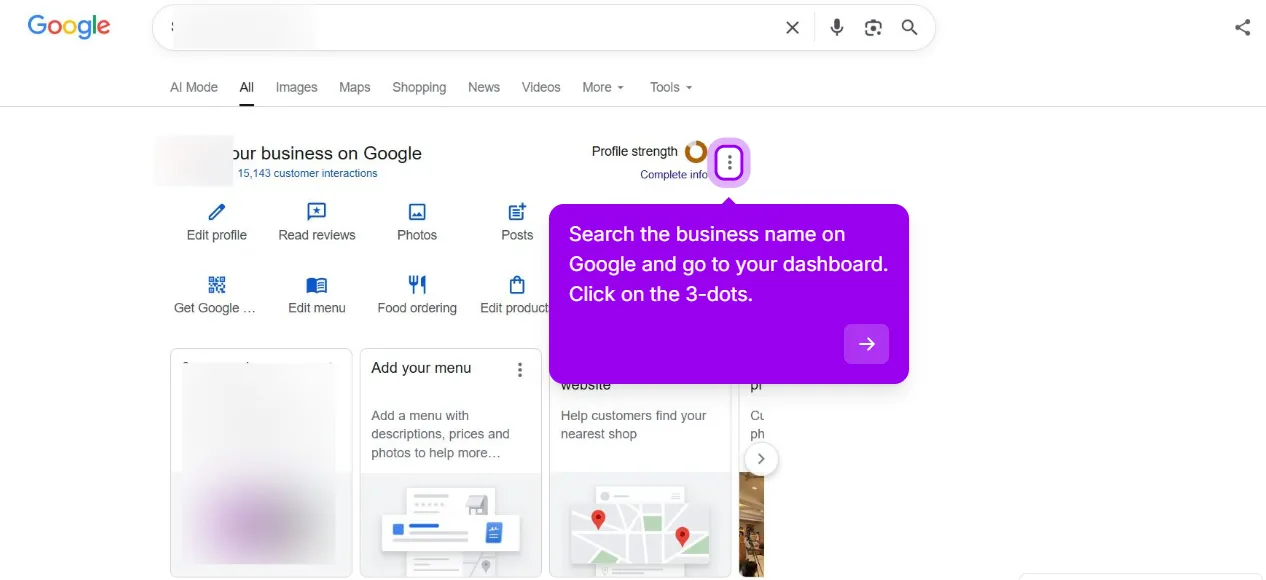
Step 1: Sign in and open the three-dot menu. Sign in with the Google account that currently holds primary ownership. Search the business name on Google, or open business.google.com. On the “Your business on Google” dashboard, click the three-dot menu next to Profile strength.
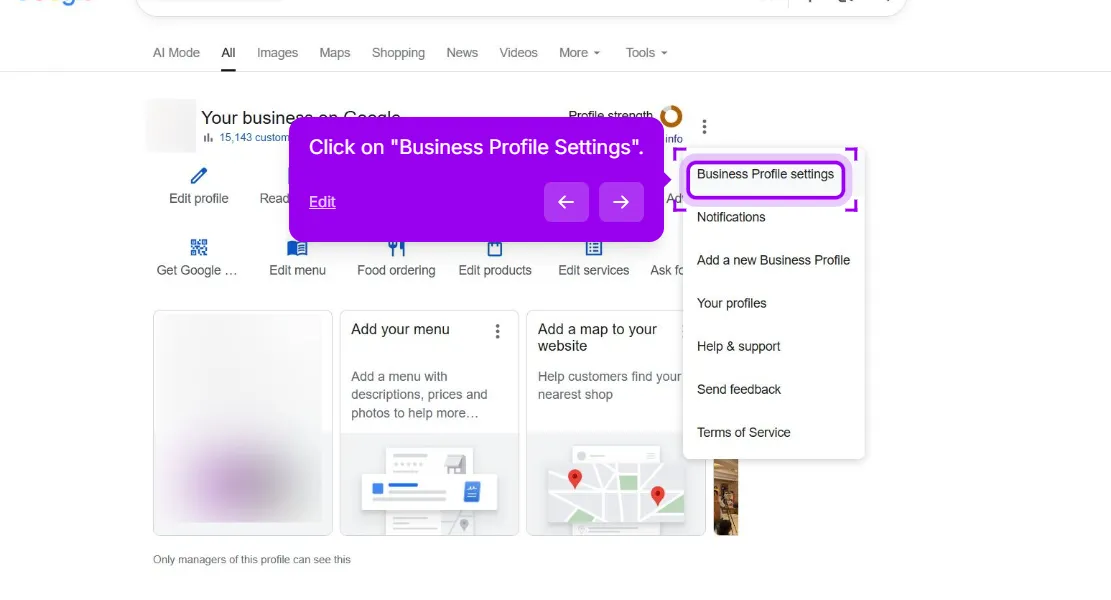
Step 2: Go to Business Profile settings. It is the first item in the menu, above Notifications and Add a new Business Profile.
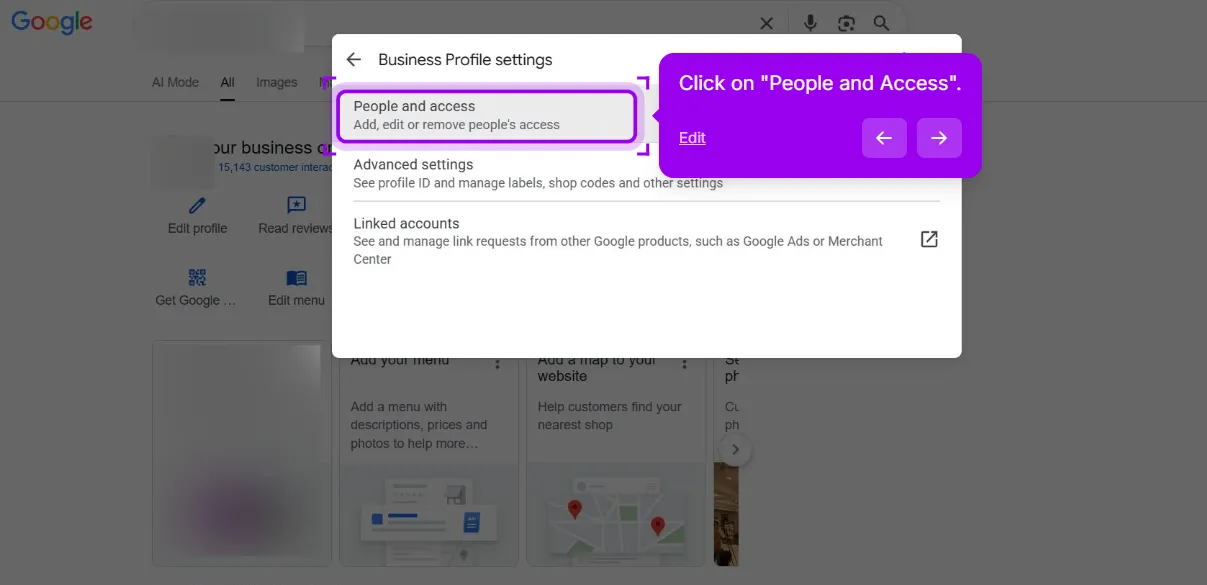
Step 3: Click People and access. The settings panel lists People and access, Advanced settings and Linked accounts. Pick the first.
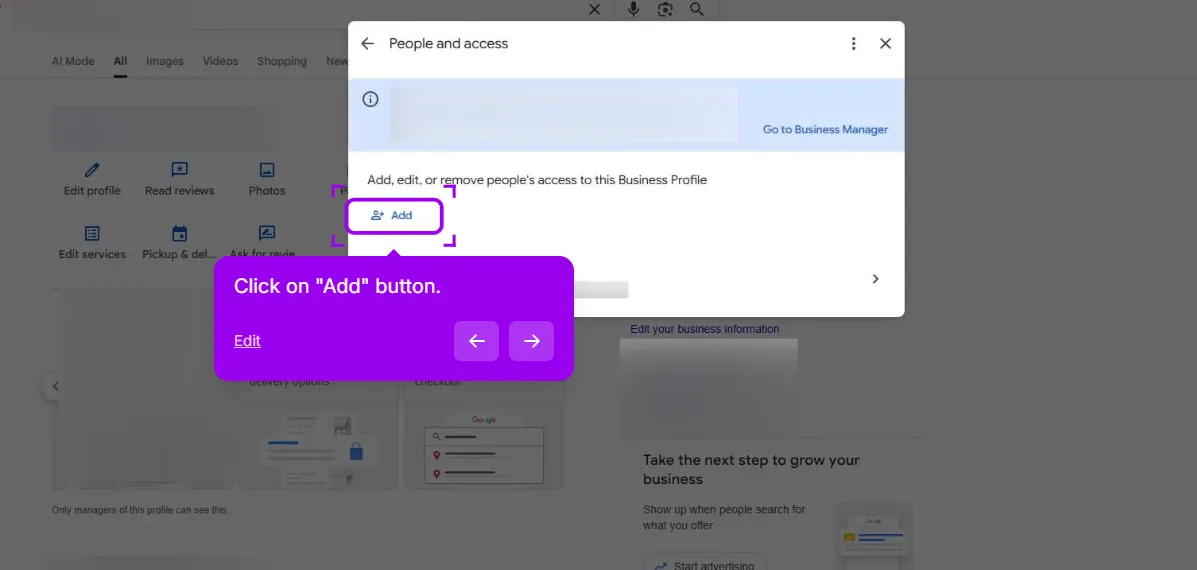
Step 4: Click Add. The People and access panel shows everyone who currently has access to the profile. The Add button sits above the list.
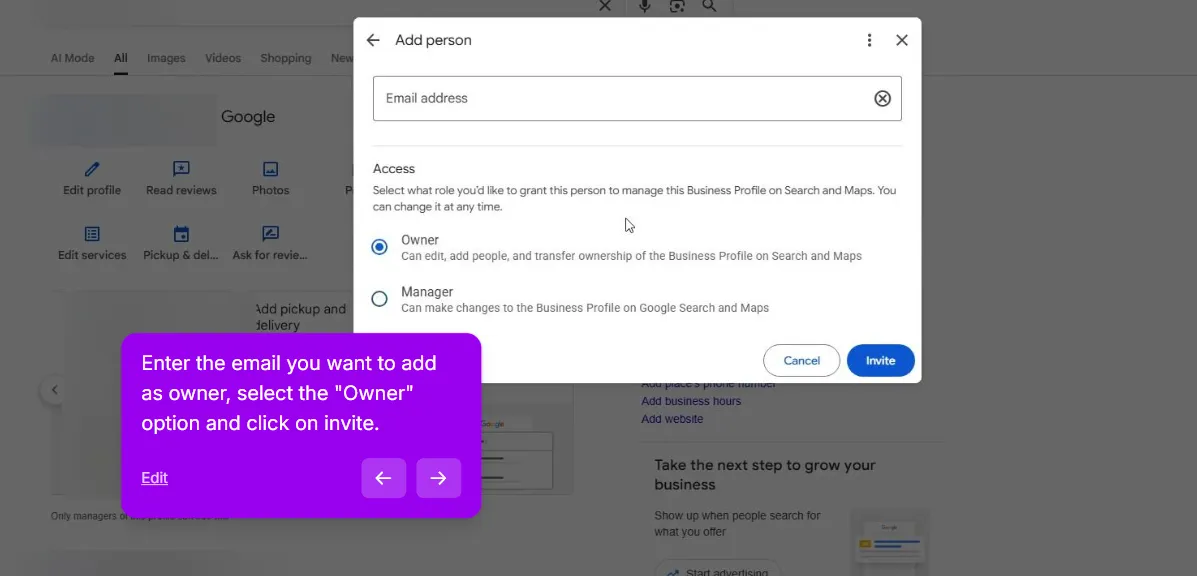
Step 5: Enter the email of the new person’s Google account and choose Owner. Owner lets them manage people while you wait for step 2. Click Invite. Google emails them an invitation; nothing has moved until they accept it from that same account.
2. Wait roughly a week
Google won’t allow a newly added person to become the primary owner immediately. In our experience they must be on the profile for about a week first, as the option does not appear until then, and the exact number is Google’s to change. Use this time to ensure the new person can sign in and access the profile.
3. Change their role to Primary owner
If the person is already on the profile as a manager or owner, you can change their role to primary owner directly. Follow these steps:
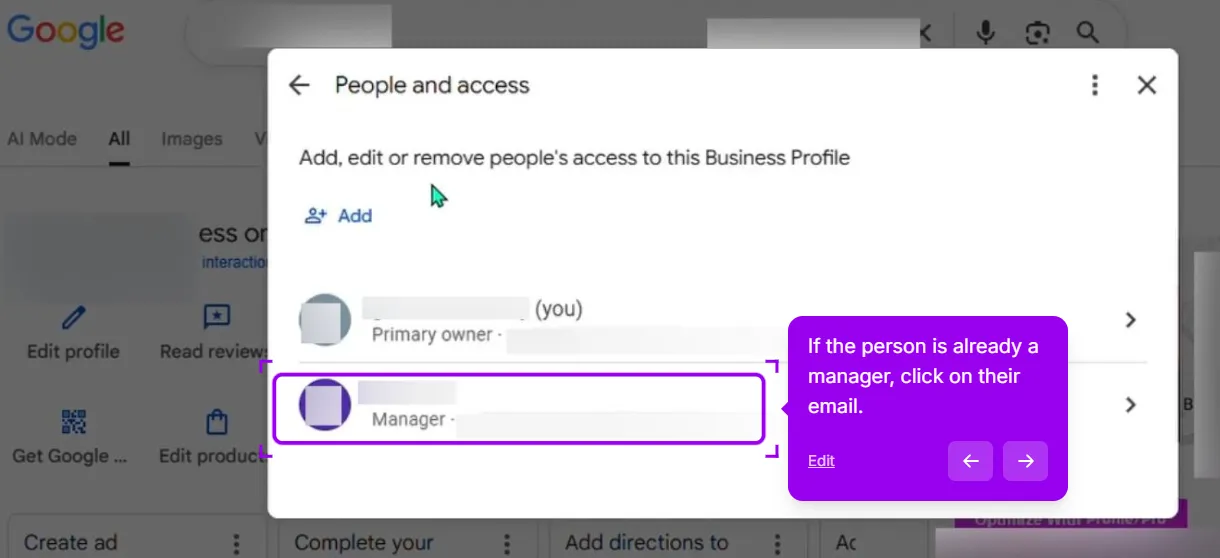
Step 1: Go back to People and access and open the person. Still signed in as the current primary owner, click the manager’s or owner’s row in the list.
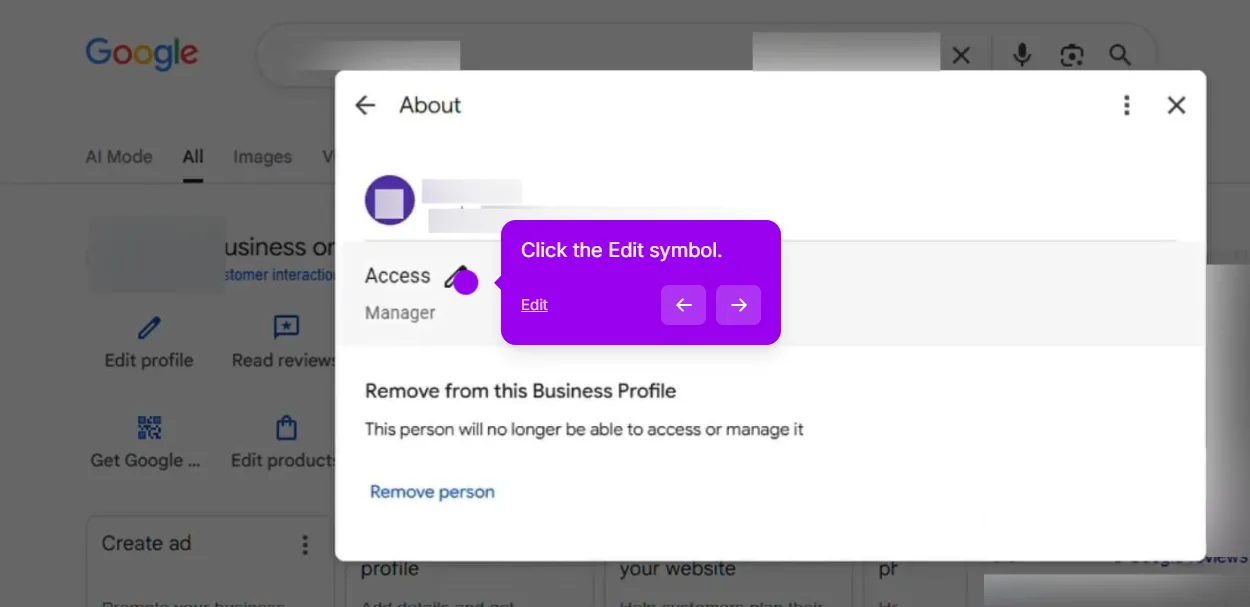
Step 2: Click the edit symbol next to Access. Their About panel shows the current role and a pencil icon beside it.
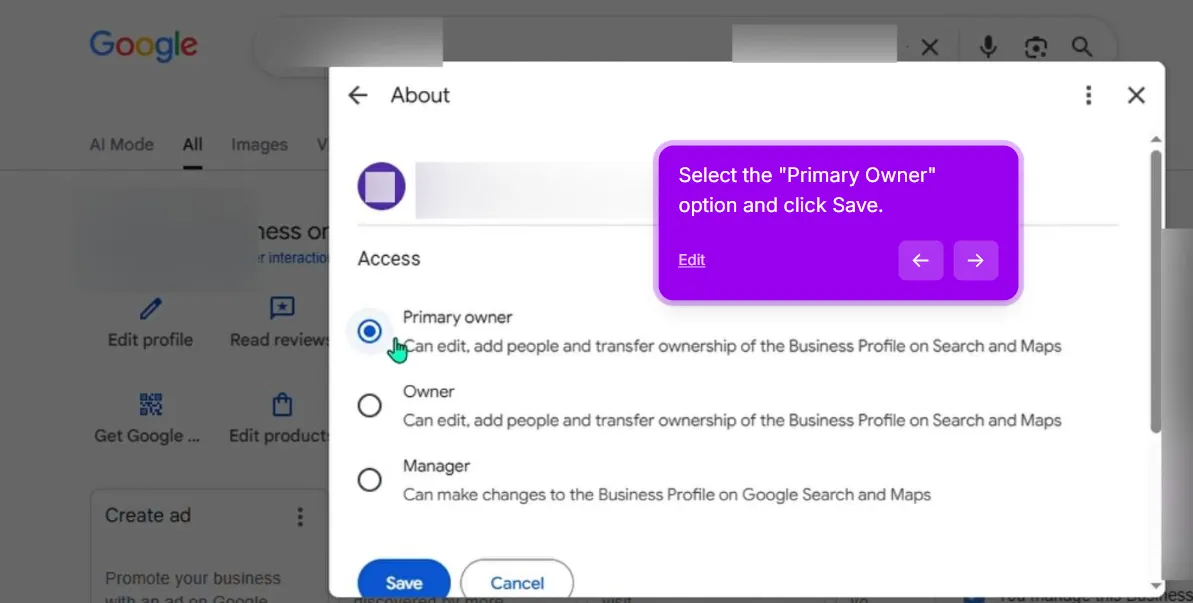
Step 3: Select Primary owner and click Save. The access options are Primary owner, Owner and Manager.
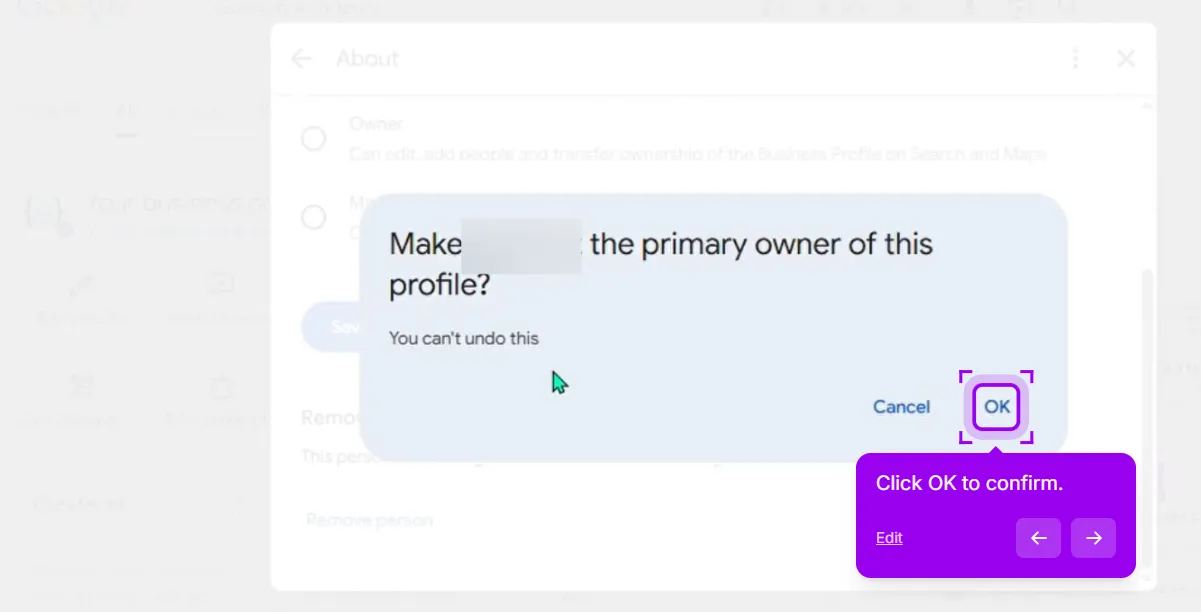
Step 4: Click OK to confirm. Google warns that you can’t undo this action. Confirm, and your own account drops to Owner.
4. Remove or downgrade the outgoing account
Only now, with the new primary owner on the list, remove the departing account, or change it to Manager if the person is staying in a smaller role. Do it in the opposite order and you get a profile with nobody holding the keys.
5. Confirm from the new account
Sign out. Sign in as the new primary owner and open People and access. Check three things: the new account shows Primary owner, the departed account is gone or downgraded, and there is nobody else on the list you cannot name.
How to add or remove a manager
Adding a manager is step 1 with a different role. Sign in as an Owner or the Primary owner, open the three-dot menu, Business Profile settings, People and access, click Add, enter their Google account email, and choose Manager. They can edit once they accept the invitation.
Removing someone is the reverse: open People and access, click the person, and choose Remove person. Only an Owner or the Primary owner can do this.
When someone leaves:
- Remove their account the day they go, and any other account on the list you do not recognize.
- If they ever used your login rather than their own, change that password and turn on 2-step verification. A removed manager who still knows the primary owner’s password has not been removed.
- Check who holds Primary owner. If it is the person leaving, you are not offboarding, you are transferring; go back to the procedure above.
How to request access when someone else owns the profile
This is the route when you are not on the list at all: the founder retired, the seller moved away, or nobody can name who claimed it years ago. It is a Google Business Profile access request, and it works whether the owner is cooperative or unreachable.
The full request flow, with screenshots, and what to do about an actively hostile owner are covered in the access recovery walkthrough. This post stops where cooperation does.
Selling or buying a business
The profile is part of what is being sold, whether or not anyone wrote it down. The reviews, photos and ranking history live on that one listing and do not move to a new one.
If you are the seller: add the buyer as Owner a week or more before closing, transfer primary ownership on the day, and let the buyer remove you afterwards. Do not delete the profile. Do not mark it closed; that status is only for a location that has actually shut, and the closure guide covers that case. Do not leave primary ownership in your personal account as a favor you will get to later.
If you are the buyer and the seller has gone quiet: use the request-access flow linked above, ask for ownership, and have the purchase agreement ready as proof.
Working with an agency without handing them the keys
An agency should never have primary ownership of your profile. Their role is to edit and report, and Manager covers all of that. We always request Manager access and check that the primary owner is an account controlled by the business. If an agency demands primary ownership, question their reasoning; there is no technical need for it.
For multi-location work, the agency can use its own organization account in Business Profile Manager. This way you retain primary ownership, and when the contract ends you simply remove one organization instead of tracking down multiple email addresses. For more than a handful of locations, set it up this way from the start; see how we handle multiple locations.
What not to do
- Do not create a new profile because you cannot get into the old one. Two listings, split reviews, and a fair chance Google merges or suspends one. The duplicate profile problem is harder to unwind than an access request.
- Do not share one login between several people. Shared logins cannot be offboarded, and a security flag on that one account takes everyone down with it.
- Do not make the agency primary owner. If it has already happened, ask them to transfer it to you today; a cooperative agency does this in one sitting plus the waiting period.
- Do not remove the old owner before the new one is in place. The order above is the order for a reason.
When you cannot get it back
Sometimes the cooperative route leads to dead ends, like when the founder has died, or the former owner can’t recover a deleted personal Gmail account. Start with the request-access flow; if there’s no response, self-verification usually becomes an option. Our rough estimate, not a Google figure, is that most people regain access within weeks if the previous owner is unreachable rather than hostile.
The ones that do not usually have a second problem underneath, most often a profile that is also suspended, which has its own recovery process. The GBP suspension check is the quickest way to find out which trigger that suspension is most likely to be.
A handover is also a good moment to check what the departing owner left elsewhere. Old directory records in their name, an abandoned profile on a second account, a phone number nobody uses: a listing cleanup surfaces those and puts them back under your account.
Gather these documents before filing: business registration in the current operator’s name, a utility bill or lease for the address, photos of signage with the business name, and the relevant paperwork if there has been a death or a sale. If you’ve filed a request and waited for months without resolution, consider whether the case belongs in the hostile-owner playbook linked above, or whether something structural about the profile needs fixing first.
This post is one piece of a bigger playbook. The full guide covers the common Google Business Profile problems in one place, with the fix for each: The GBP cheat sheet.
Handing a profile over and want it done cleanly? We run the transfer for you, paid upfront and refunded in full if we cannot get it moved. Transfer my profile


