
What Google says the review restriction is
When Google detects suspicious review activity or a policy violation, its own pages say it may show a banner that suspicious reviews were removed, stop people posting reviews or ratings for a period, and hide the profile’s reviews for a period.
For Fake Engagement violations it also removes the violating reviews and emails the owner before applying a restriction. Google’s restrictions page gives no durations.
Is this your problem?
- A warning on your profile, “Posting reviews is turned off”, and an email from Google about suspicious reviews: This is the 30-day restriction. This post is for you, keep reading.
- An email saying reviews are “temporarily paused” after a spike in spam reviews: A shorter pause. The email, shared on a forum, says it usually lifts within a few days. If it doesn’t, use the “request a review” link in the email.
- Photos, posts and edits are being rejected too: A different restriction, called “temporary protection”. It takes anywhere from 2 weeks to a month.
- New reviews don’t show up, but there’s no warning and no email: Usually the normal review filter. See why Google reviews disappear. Experts have also seen unannounced blocks lasting months on businesses that bought fake reviews.
- No Review button on a new profile: A different problem. See this guide.
What happens, step by step
- Google spots suspicious reviews: Its systems flag them, or you’ve broken its review rules.
- It removes them: It may also hide other reviews for a while. In one expert’s tracked case, 342 of 595 reviews were removed.
- It tells you: Google emails the profile owner and adds a warning to the Reviews tab. The wording varies, for example “Suspicious reviews were recently removed from this profile”. Customers who try to review see “Posting reviews is turned off for this place”.
- New reviews are blocked: Experts most often report the block is for 30 days.
- It ends: Reviews show up again. In one forum report, new reviews arrived within hours of day 30.
Longer blocks also happen
- 60 days: a forum regular says this is now the length for incentive cases.
- 2 months: a notice shared in July 2026 for a repeat violation.
- 6 to 8 months: unannounced blocks one Product Expert tracked on businesses that bought fake reviews.
What causes it
Google’s written rules ban:
- Paying for reviews, or giving discounts, gifts or freebies for them
- Pressuring customers to review while they’re in your shop
- Staff review quotas, or asking for reviews that name a staff member
- Asking only happy customers
- Reviews from staff, friends or family
- Unusual numbers of reviews
Experts also see these habits before blocks:
- Reviews written inside the business, like on store Wi-Fi or a tablet
- A QR code at the counter, table or checkout that opens the review form
- Sudden 10 or more reviews in one day, if your usual frequency is less.
Any one of these alone is usually fine. In one expert’s tracked case, Google acted after about 3 months of review volume at nearly 3 times normal.
What to do now
- Confirm it: Open your profile on Google Search or Maps while signed out and tap Reviews. Look for the warning. Several locations? Check each profile’s Reviews tab.
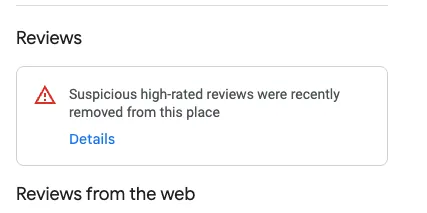
- Find Google’s email in the account that manages the profile: Note the date and screenshot your review count.
- Stop asking for reviews in your shop: That means counter QR codes, tablets and staff asking at checkout.
- Stop rewards and staff targets.
- Don’t ask customers to post again: Nothing shows during the block, and posting the same text twice breaks Google’s rules. See reviews that disappeared after they were live.
- Decide whether to appeal. See below.
Should you appeal?
Google lets you appeal. It checks your profile again, reads anything extra you send, and tells you the result. Use Google’s appeal form.
-
Appeal if your reviews were real and you can explain how you collect them, or someone is spamming your profile. See coordinated fake reviews.
-
Skip it if you did offer rewards or set staff targets. Whitespark’s advice is to fix it yourself instead of reporting it, including removing reviews you told staff to post.
-
Don’t expect it to be faster. In the cases Platinum Product Expert Claudia Tomina tracked, every block ran the full 30 days, even with appeals. Another Product Expert, Joy Hawkins, says support only replies that it’s monitoring the block.
Claudia still files, so the case is on record, and I’d do the same.
Send one appeal, then wait.
How to get reviews again safely
Start once new reviews show up again.
-
Ask a few customers at a time: Avoid days with 10 or more new reviews. That’s the size experts point to, and Google doesn’t publish a safe number.
-
Use different ways to ask: receipts, thank-you emails, chat or texts. Google’s own help page suggests the first three.
-
Ask customers to post later, on their own phone data, not your Wi-Fi.
-
QR codes: Google’s own page tells owners to display one in-store, so it isn’t banned. The risk is the mix of QR code plus reviews written in the shop.
Whitespark suggests pointing the code to a Google search for your business name instead of the review form. They say there’s “reason to believe” it helps, so it’s a tip, not a rule.
More on what triggers the filter in the first place, and how to keep the pacing and wording in our structural fixes blog.
What doesn’t help
- Contacting support again and again
- Starting a new profile
- Replacing lost reviews with ones from staff, friends or family
This post is one piece of a bigger playbook. The full guide covers the common Google Business Profile problems in one place, with the fix for each: The GBP cheat sheet.
Not sure which restriction you have, or whether an appeal is worth it? Send us your profile and the warning, and we’ll tell you. Once reviews are back, review requests are part of our Google Business Profile service. Check my review block


